
The short answer.
Almost never for the whole site. Google’s Search Console setting (Settings › Search generative AI › Exclude) removes your links and content from AI Overviews, AI Mode and Discover’s AI features, and Google states plainly that excluded sites will not receive any traffic or impressions from those features. The AI Overview still appears for the query; it simply cites someone else. For a business that wins work by being found while buyers research, that is usually a straight loss.
Opting out can make sense for one part of a site: paid research, licensed data, customer-only documentation, or text that must never be paraphrased. Google lets you set the switch on a subfolder or subdomain through a URL-prefix property, and narrower tools (data-nosnippet, max-snippet, noindex) handle single pages and paragraphs. If your real worry is Gemini training on your content, the switch is the wrong tool: that is Google-Extended, and it does not touch Search. If your worry is how much of your Search traffic now comes from AI features, our guide to the Search Console AI performance report covers how to read the numbers; this guide is about the decision.
Prolinkage summary of Google Search Central, “Controls for generative AI” and “Robots meta tag” (updated 24 November 2026), and the Search Console Help page on the Search generative AI control, all read 25 November 2026. Teal cards touch AI Overviews and AI Mode; the amber card does not.
What changed in 2026.
Until this year the only levers were the snippet controls, which also strip the description from your blue link, or noindex, which removes the page from Google. Three things changed that.
- The UK regulator required it. In June 2026 the Competition and Markets Authority imposed a conduct requirement on Google Search under the UK’s digital markets regime. It requires a way for sites to opt out of AI features such as AI Overviews and AI Mode, an opt-out from training, clear attributed links in AI results and, within nine months, page-level controls (Search Engine Journal, 4 June 2026).
- Google shipped one switch for everyone. The Search generative AI control in Search Console started with a subset of sites. Google’s help page now says that as of 31 August 2026 it has rolled out to all websites worldwide, so a US company has the same switch as a UK one.
- The documentation was rewritten on 24 November 2026. Google’s new “Controls for generative AI” page separates two uses of your content, training (teaching models such as Gemini) and grounding (fetching fresh pages from the index to answer a question and link to sources), and maps each control to each use. A companion page on how AI Overviews choose links adds that a page is eligible only if it is indexed, can show a snippet, and belongs to a site that is included in the Search Console setting.
The same documentation says Google intends to support a shared machine-readable training preference signal in early 2027. That is a training control, not a Search one, so it will not change the decision in this guide.
Six controls, six different jobs.
Most bad decisions here come from using one control to do another’s job, such as blocking Google-Extended and expecting AI Overviews to stop. The table puts Google’s wording side by side.
| Control | Where it lives | AI Overviews and AI Mode | Classic results | Training | Scope |
|---|---|---|---|---|---|
| Search generative AI: Exclude | Search Console › Settings | Links and content removed; not used to ground answers | Not a ranking or inclusion signal for other parts of Search | No effect | Domain, subdomain or URL-prefix property |
| nosnippet | Robots meta tag or X-Robots-Tag header | Content not used as a direct input | No text snippet or video preview | Not stated | One page |
| max-snippet:[n] | Robots meta tag or header | Limits how much content may be used as a direct input | Snippet capped at n characters; 0 equals nosnippet | Not stated | One page |
| data-nosnippet | Attribute on span, div or section | Marked text kept out of what can appear | Marked text kept out of snippets | Not stated | Part of a page |
| noindex | Robots meta tag or header | Page gone | Page gone | Not stated | One page |
| Google-Extended | robots.txt token | No effect | No effect; not a ranking signal | Limits training and non-Search grounding | Site or paths |
Four details matter in practice. First, the Search Console switch inherits: a domain property is the parent of every subdomain and URL-prefix property beneath it, and a child you configure overrides the parent for that folder and everything under it. Second, Google says exclusion generally applies within one to two days, though caching can make some content take longer. Third, Google-Extended has no user agent of its own (Googlebot and other crawlers record the page’s status), so you will never see it in a log file; our AI crawler log-file check shows what you can see. Fourth, the switch only governs Google. ChatGPT, Perplexity and Copilot use their own crawlers and their own rules, which our guide to llms.txt, robots.txt and AI crawlers sets out bot by bot.
What opting out costs a B2B site.
The case for opting out rests on a real loss: AI Overviews take clicks from the pages beneath them. Ahrefs compared desktop Search Console data for 300,000 keywords in December 2023 and December 2025 and found the top-ranking page’s click-through rate was about 58% lower when an AI Overview was present (Ahrefs, 4 February 2026, a vendor study).
Ahrefs, 300,000 keywords, aggregated desktop Search Console data, December 2025 against a forecast without AI Overviews; published 4 February 2026 (vendor study). Bar length relative to 70%.
But opting out does not give those clicks back. The AI Overview still sits above your result; you are simply no longer one of its sources. You lose the citation and keep the lower click-through rate. Three other findings point the same way:
- The only published opt-out test saw organic clicks fall. Cyrus Shepard switched the control off for one site. AI impressions, about 8% of the site’s total, dropped to zero at once, and ordinary organic clicks fell too. He calls it a search-results “halo effect”: appearing in more places on the page makes a click more likely, including lower down (Search Engine Roundtable, 30 October 2026). It is one small site, and the write-up says so.
- Google says the clicks you keep are better. Its AI features page states that when people click from results pages with AI Overviews, “these clicks are higher quality”. That is Google’s claim, not an independent measurement, but it is the claim worth testing in your own CRM.
- Links are moving down inside the answer. Peec AI data shows the share of AI Overviews whose first inline link sits in the top third of the answer fell from 76.8% on 21 September to 51.8% on 20 November 2026 (Search Engine Roundtable, 24 November 2026, vendor data). Being cited is getting less valuable per answer, which is a reason to measure, not a reason to leave.
For a B2B company the arithmetic differs from a publisher’s. A publisher sells the visit; you sell a contract that a buying group researches over weeks, and an answer that names and links you is part of that research even when nobody clicks. Our zero-click data for B2B covers the traffic side in more depth.
When opting out can make sense.
The control was built for publishers whose content is the product. A few B2B sites have sections like that, and those sections are where a test is worth running:
- Paid research and benchmark data. If customers pay for an annual survey, an AI answer restating its headline numbers competes with the sale. Exclude the research folder; keep the page that sells it included.
- Customer-only documentation. Help centres rank for detailed questions and send little new business. If tickets show customers trusting summaries that miss version-specific steps, excluding the docs subdomain is defensible.
- Licensed or syndicated content. If a partner contract restricts reuse, take legal advice on whether the switch, Google-Extended or both are needed.
- Text that must not be paraphrased. Regulated disclaimers and contract terms read badly when summarised. data-nosnippet on that block is usually enough.
Service pages, case studies, comparison pages and guides are not on the list: they exist to be found and quoted. If an AI answer describes your service wrongly, opting out removes you but leaves the wrong description to be built from other sources. Our guide to fixing how AI describes your company covers the better route.
Narrower tools to try first.
Most problems that lead people to the switch are smaller than the switch. Here is what each narrower control looks like in the source.
1 · Keep one paragraph out of snippets and AI answers
<div data-nosnippet>2027 rate card: valid for signed contracts only…</div>2 · Let Google quote a little, not the whole method
<meta name="robots" content="max-snippet:160">3 · A PDF report: no snippet, no direct AI input
X-Robots-Tag: nosnippet4 · Keep research out of Gemini training (Search unchanged)
User-agent: Google-Extended
Disallow: /research/
Examples written by Prolinkage from the syntax in Google’s robots meta tag and Google-Extended documentation. Test on one URL and check the live HTML before rolling out.
Three cautions from Google’s own pages. data-nosnippet works only on span, div and section elements, and the HTML must be valid with every tag closed, or the marked text may leak. A max-snippet value you set years ago to tidy your search descriptions now also limits how much of the page AI features may use, so search your templates for it. And nosnippet on a page that sells strips the description from your ordinary blue link as well, which usually costs more clicks than the AI Overview ever took. Our AI Overviews guide includes a template check for both.
The decision test.
Run these five questions in order. Each one either ends the decision or narrows it. Most B2B sites stop at question 2 or 3.
- 01 · GOALIs it AI answers you object to, or training, one paragraph, or the page itself?
- 02 · EXPOSUREDoes the AI performance report show impressions at all?
- 03 · MODELIs the content the product, or does it sell the product?
- 04 · EVIDENCEHave qualified enquiries fallen on pages with AI impressions?
- 05 · SCOPECan you test one folder before the whole domain?
Training goes to Google-Extended; a paragraph goes to data-nosnippet; a page that should not be in Google goes to noindex. Only the AI-answers branch reaches the switch.
Question 2 needs the Generative AI performance report, which shows impressions but no clicks or queries. Read impressions by page, then compare those pages’ enquiries in your CRM. If you do not yet separate AI referrals, our GA4 AI channel setup makes question 4 answerable.
Question 4 is where most cases end. A fall in sessions is not evidence of harm on its own. Traffic moves with core updates and seasons too, so check whether the fall is about AI at all with our guide to telling AI Overview losses from core update losses. Harm, for a B2B site, means fewer qualified enquiries or opportunities from the pages concerned, measured against a comparable period.
The decision tree.
Answer five questions about your site. The tree returns the control that fits, or tells you to leave things as they are. Nothing you choose is sent anywhere.
Choose what you want to stop to begin.
Based on Google’s documentation as read on 25 November 2026. A starting point for a decision, not legal advice.
The tree never recommends excluding a whole domain in one step: the property structure lets you test a slice first, and nobody can know in advance how your organic clicks will move when the citation goes.
If you test it, test a section.
A switch you cannot measure is a guess. The property structure in Search Console makes a controlled test possible: verify a URL-prefix property for the folder you want to test (for example https://www.example.com/research/), set it to Exclude, and leave a comparable folder included as the control group.
| Week | Action | What to record |
|---|---|---|
| −4 to 0 | Baseline both folders. Note any core updates or reporting gaps in the window | AI impressions by page; Search clicks and impressions; enquiries, sign-ups or sales from organic and AI referrals |
| 0 | Verify the URL-prefix property and set it to Exclude. Log the date and who changed it | A screenshot of the setting and the property’s owner list |
| 1 | Confirm exclusion: AI impressions for the folder should fall to zero within days | AI impressions; any change in average position on the folder’s main queries |
| 2 to 8 | Change nothing else on either folder | Weekly organic clicks and outcomes, test folder against control folder |
| 8 | Decide: keep, reverse, or widen. Reversing means choosing Include or Inherit | The difference in outcomes, with the dates and the caveats written down |
Two governance points. Property owners can change the setting, so check the owner list for former agencies and developers before you start; Search Console also notifies the domain owner when a child property overrides the parent. Google gives no timing for coming back in, so do not run the test across a launch or trade show.
For UK readers, the CMA’s requirement for page-level controls falls due nine months from June 2026; Search Engine Journal’s 1 August explainer dates it to March 2027. If that arrives as a per-page setting, single-page tests will become possible. Until then, the folder is the unit. Our branded vs non-branded Search Console guide shows how to split the clicks you record, so brand demand does not hide the effect.
What staying in looks like in our work.
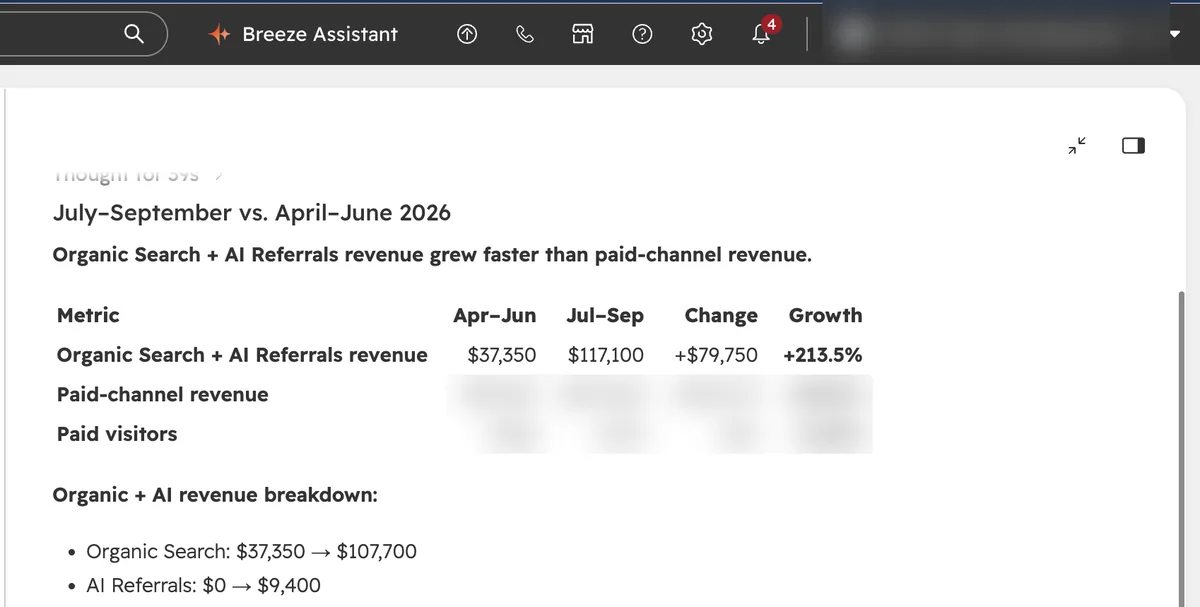
We have not opted a client out of AI features. What we do first is measure whether AI answers bring business, because that is the number the decision turns on. For a US B2B company (name withheld), HubSpot credited organic search and AI referrals with more closed-won revenue in the third quarter of 2026 than in the second, and AI referrals appeared as a revenue source for the first time.
A US B2B company (name withheld). Closed-won HubSpot revenue credited to Organic Search and AI Referrals: $37,350 (Apr–Jun 2026) to $117,100 (Jul–Sep 2026). AI Referrals alone: $0 to $9,400.
 Open the screenshot at full size ↗
One quarter against another is not a controlled test, and the AI referral figure is not a measure of Google’s AI Overviews alone. What it shows is that AI answers can sit in the path to a signed deal, which is exactly what a site-wide opt-out would cut. Our write-up of that CRM result explains the method, and our case studies show other dated results.

“Prolinkage conducted a detailed audit followed by in-depth discussions, providing valuable insights into the implementation process and ensuring seamless execution.”
We treat this decision the same way: read the AI report and the CRM together, then decide section by section.
Where this advice does not apply.
Google rewrote these pages on 24 November 2026 and plans a training preference signal for early 2027, so recheck the controls page before you act on this guide next year. When the December core update lands, our December 2026 core update briefing will cover what it means for the pages you keep in.
Questions owners ask.
How do I opt my website out of AI Overviews?
In Search Console, open Settings, then Search generative AI, and choose Exclude for the property. It covers AI Overviews, AI Mode and Discover’s AI features, and Google says it generally applies within one to two days. Your pages stay in classic results. To exclude only a folder, set it on a URL-prefix property for that folder.
Does opting out of AI Overviews hurt rankings?
Google says the control is not a ranking or inclusion signal for other parts of Search, so your classic rankings should not change because of it. You do lose all traffic and impressions from the AI features, and one small published test saw ordinary organic clicks fall as well.
Does blocking Google-Extended remove my site from AI Overviews?
No. Google-Extended limits the use of your content for training Google’s models and for grounding in Google AI products outside Search. Google states it does not affect inclusion in Search. AI Overviews and AI Mode are governed by the Search Console switch and the snippet controls.
Can I turn off AI Overviews on Google as a searcher?
There is no setting that removes them for good. Choosing the “Web” filter under the search box shows plain web results for that search, and a browser search engine using the udm=14 parameter makes that the default. That changes what you see, not whether your site appears for others.
How do I opt out of AI completely?
No single switch does it. For Google, combine the Search Console exclusion with a Google-Extended rule. For other AI companies, add robots.txt rules for each of their crawlers, which differ between search and training bots. For a B2B site that wants buyers to find it, opting out completely is rarely wise.
Can I opt out of AI Overviews for some pages but not others?
Not page by page with the switch today: it works by property, so a folder or subdomain is the smallest unit. For single pages use nosnippet or max-snippet, and for a passage use data-nosnippet. Page-level controls are due under the UK CMA requirement by about March 2027.
Sources: Google Search Central, Controls for generative AI (updated 24 Nov 2026); Search Console Help, Search generative AI control; Google, Robots meta tag specifications; Google, Google-Extended (updated 24 Nov 2026); Google, AI features and your website; Google, how AI features select links (updated 24 Nov 2026); Google Search Central blog, 3 Jun 2026; Search Engine Journal, 4 Jun 2026; Search Engine Journal, 1 Aug 2026; Search Engine Roundtable, 30 Oct 2026; Search Engine Roundtable, 24 Nov 2026; Ahrefs, 4 Feb 2026, vendor study; tenbluelinks.org, udm=14 how-to. All accessed 25 November 2026. Client result: a US B2B company (name withheld), HubSpot, Q3 vs Q2 2026.