
The short answer.
Google Ads conversion tracking for lead generation works in two layers. The first records the enquiry: the Google tag (installed directly or through Google Tag Manager) fires when a form is submitted and ties it to the ad click. The second records what the enquiry became: your CRM marks it qualified, and that outcome goes back to Google Ads through enhanced conversions for leads. Make the qualified lead the primary conversion action, count it once per click, and keep the raw form fill as a secondary action. Smart Bidding then chases enquiries your sales team wants, not anyone who presses Submit.
Prolinkage framework, built from Google Ads Help on website conversions, enhanced conversions for leads and consent mode (read 25 November 2026). Most setups stop at step 4. Steps 5 to 7 are what make bidding chase qualified leads.
Why a form fill is the wrong thing to count.
A conversion in Google Ads is whatever you tell it to count. Count every form submission and you get a tidy cost per conversion and a bidding system that cannot tell a procurement manager from a student, a competitor or a bot.
The published benchmarks show how wide the gap is between a counted lead and a sales conversation. LocaliQ’s search advertising benchmarks (updated 1 June 2026, compiled from thousands of its customers’ campaigns) put the all-industry conversion rate at 8.18% and the cost per lead at $66.69. Business Services, the category most B2B firms fall into, converts at 4.85% with a cost per lead of $93.69.
LocaliQ search advertising benchmarks, last updated 1 June 2026 (vendor data from its customers’ campaigns). Bars are scaled within each pair. A “lead” here is any conversion the advertiser counted, not a qualified enquiry.
Here is how one genuine enquiry becomes several “conversions”, in patterns we find in audits:
| What fired | Why it counted | The fix |
|---|---|---|
| Google Ads tag on the thank-you page | The intended conversion | Keep, count “One”, make secondary once a qualified stage exists |
| GA4 key event imported into Google Ads | Same submission, second source, also set to primary | Keep one source as primary; the other secondary or removed |
| Thank-you page reloaded or bookmarked | Counting set to “Every”, the website default | Change counting to “One” for lead actions |
| Contact page view, imported as a key event | Someone marked a page view as a key event | Secondary at most; never a bidding goal |
Reported cost per conversion falls, CRM enquiries stay flat, and bidding learns to find more of the wrong thing. If you suspect this, our GA4 lead-numbers audit walks through the double counts on the analytics side, and our piece on cost per lead versus cost per qualified opportunity explains which number to report upwards. If the leads are real but sales says they do not close, that is a different problem, covered in our recovery playbook for Google Ads leads that don’t convert.
The tracking map, piece by piece.
Five parts have to work together. If one breaks, the conversion is lost or credited to the wrong campaign.
- Auto-tagging. Adds a click identifier, the gclid, to your landing-page URL. Google treats it as a prerequisite for accurate measurement. Click trackers and redirects must pass the gclid on to the landing page; when one drops it, nothing errors and the conversion goes unattributed.
- The Google tag. Google describes it as setting “new cookies on your domain that will store a unique identifier for a user or the ad click”. When the conversion happens, the tag reads that cookie and reports the conversion against the original click.
- The Conversion Linker. In Google Tag Manager, this tag does the cookie work. Without it on every page, a visitor who browses before enquiring may not be credited to the ad.
- The form. It keeps the gclid in a hidden field and collects a work email, so the enquiry can be matched when the CRM outcome comes back.
- The CRM. It stores both against the contact, records when the lead qualified, and sends that back. Most setups skip this part.
Our guide to tracking website leads from first visit to CRM covers the source fields every enquiry should carry for all channels, not only Google Ads.
Where to find the Google Ads conversion tag.
In the current Google Ads interface, conversions sit under Goals → Summary. Open a conversion action and choose its tag setup. What you find depends on how the action was built:
- Google tag plus event snippet. The Google tag (on every page) plus an event snippet for the conversion, under “See event snippet”. The snippet holds the conversion ID and label.
- Google Tag Manager. You copy the conversion ID and label into a Google Ads Conversion Tracking tag. The setup flow can add suggested tags to a GTM workspace, though not for codeless actions.
- URL-based, no code. Created “automatically without code”, it has no snippet; it fires when a page matching your URL rule loads.
- Imported from GA4. No Google Ads tag; the conversion is a GA4 key event, so your GA4 setup is what matters.
How to read the status next to each conversion action
Unverified, Tag inactive, Needs attention or Misconfigured: the tag has not been seen, or something in the setup is broken. Misconfigured means recording has stopped entirely. Hover over the status, choose Troubleshoot, and Tag Assistant opens your site so you can submit a test enquiry.
Awaiting conversions: nothing recorded in the last 7 days. Usually the action is under 48 hours old, the campaigns are paused or traffic is too low.
Active: tracking works as set up. It does not mean it is counting the right thing.
Status names from Google Ads Help on troubleshooting tracking status and Tag Assistant, read 25 November 2026; older accounts may still show earlier labels. In Tag Assistant, start from a landing page, not the thank-you page, so the test includes the click-to-form journey.
One check catches many problems: look on the converting page for a second Google tag or GTM container, or an old conversion tag from a previous agency. Google’s sitewide tagging guidance tells you to remove legacy tags from converting pages and to avoid several tags or containers on one page, then to allow 24 to 48 hours for the status to update after a fix.
Setting up conversion tracking for a lead form, step by step.
For most B2B sites the reliable route is Google Tag Manager plus a form-submission event your developer controls. Our sequence:
- Turn on auto-tagging and check that a test click lands with a gclid in the URL.
- Add a data source. In Goals → Summary, edit the data sources for conversions on a website, enter your domain and scan. Google detects an existing Google tag or GA4 property.
- Create the conversion action. Choose the category (Submit lead form is usual), name it plainly, such as “Lead submitted (website form)”, and pick the method.
- Pick the trigger that proves a real submission. In order of reliability: a data-layer event your form pushes after a successful send; a thank-you page that only a successful submission can reach; a GTM form-submission trigger. Avoid button-click triggers, which fire on failed validation too.
- Capture the gclid and email so the CRM stores them with the contact, ready for the qualified upload later.
- Test end to end. Click a real ad (or use Tag Assistant from a landing page), submit the form, and confirm three things: the tag fired once, the CRM record holds the gclid, and the status in Google Ads moves to Active within a day or two.
Thank-you page or event? A thank-you URL is simplest, but double-counts on reloads unless counting is “One”, and breaks when a form shows an inline success message. A data-layer event is more dependable. Forms embedded in iframes need the provider’s own event, because GTM cannot see inside the frame.
Google Ads tag or GA4 import? Both are allowed, and Google Ads Help says you can use any combination at the same time. The rule is that one source per enquiry is primary. The Google Ads tag reports faster and attributes to the click; imported GA4 key events can take up to 24 hours to appear and follow GA4’s own counting, and actions created from the GA4 interface arrive as secondary until you change them.
The settings that decide what bidding learns.
To change conversion settings, open Goals → Summary, select the conversion action and edit its settings. These are the ones that matter for leads, and what we set them to.
| Setting | What it does | What we usually set |
|---|---|---|
| Action optimisation (primary or secondary) | Primary actions appear in the “Conversions” column and are used for bidding; secondary actions appear only in “All conversions” | Qualified lead primary; raw form fill secondary once qualified data flows |
| Count | “One” counts one conversion per ad click; “Every” counts each one. Website actions default to “Every” | “One” for every lead action |
| Click-through conversion window | How long after a click a conversion can be credited. Default 30 days, settable from 1 to 90 depending on source | 90 days for qualified and won stages; 30 for the form fill |
| Value | The value bidding sees for each conversion | Different values per stage once you know them; otherwise the same for all and bid on cost per acquisition |
| Attribution | How credit is split across ad interactions | Data-driven where it is offered, so credit is not handed to the last click by habit |
| Enhanced conversions | Sends hashed form data to improve matching | On, with consent handled (chapter 9) |
Two warnings from Google Ads Help: counting changes apply only to future reporting, and a longer window does not retroactively count conversions outside the old one. Fix settings first, then judge performance on later data.
A typical B2B account, as we find it and as we leave it
| Conversion action | Before | After |
|---|---|---|
| Contact page view (GA4) | Primary · Every | Removed |
| Form submit (GA4 key event) | Primary · Every | Secondary · One |
| Lead submitted (Google Ads tag) | Primary · Every | Secondary · One · 30 days |
| Calls from ads | Primary · any length | Secondary · minimum call length set |
| Qualified lead (CRM upload) | Not set up | Primary · One · 90 days |
| Closed-won (CRM upload) | Not set up | Secondary · One · deal value |
An invented account for illustration, not a client’s data. Before: four primary actions counting one enquiry up to four times. After: one primary action that sales defines.
How Google Ads calculates conversion rate.
Google Ads defines conversion rate as “the average number of conversions per ad interaction, shown as a percentage”. Its own example: 50 conversions from 1,000 interactions is 5%. Four details change what that number means in a lead-generation account.
- Only primary actions count. The “Conversions” column, and the conversion rate built on it, include primary actions only. Secondary actions sit in “All conversions”. Move the form fill to secondary and your conversion rate drops sharply. That is the point.
- It can exceed 100%. With several primary actions, or counting set to “Every”, one click can produce more than one conversion. In our experience, a conversion rate above 20% on a B2B search campaign is usually a counting problem before it is a success story.
- Conversions are dated to the click. Google Ads reports a conversion against the date of the click that led to it, while GA4 uses the date it happened. Recent days always look weak until late conversions arrive.
- Lag hides results. Segment any report by Conversions → Days to conversion to see your lag. Google advises that the date range should end at least 30 days ago (longer with a longer window) for complete data, which matters most for qualified-lead actions that arrive days after the click.
A worked example: 1,000 clicks, 60 form fills, 21 qualified. With the form fill as primary, conversion rate is 6%; with the qualified lead, 2.1%. The lower number is the one to judge bidding on. Our article on Google Ads costs in 2026 shows how the same counting error inflates waste elsewhere in the account.
From form fill to qualified lead.
The step that turns tracking into lead generation is sending the CRM outcome back. Google’s route is enhanced conversions for leads, “an upgraded version of offline conversion import” in Google’s words. The Google tag captures hashed contact details from the form; later you upload the leads that qualified, and Google matches them to the ad interaction. Three 2026 changes matter:
- April 2026: enhanced conversions for web and for leads were combined into a single setting in Google Ads.
- 15 June 2026: Google made the Data Manager API the main route for offline conversion uploads. The Google Ads API stopped accepting new adopters of offline click conversion import (Google Ads Developer Blog, 15 May 2026). Existing integrations kept working while they migrate.
- Matching: Google still advises including the gclid with uploaded conversions whenever possible to maximise accuracy, so keep capturing it on the form.
Most mid-market teams need no API work: use Data Manager in Google Ads, or your CRM’s native connection, to send a “Qualified lead” stage. Our offline conversion tracking guide covers the CRM field map, lifecycle stages and failure points in detail; this article stays with the Google Ads side.
- 01 · VOLUMEAt least 15 qualified leads in the last 30 days? Make “Qualified lead” primary.
- 02 · SPEEDQualified usually decided within 7 days of the click? Good. If longer, define an earlier stage sales can mark faster.
- 03 · TOO FEWUnder 15 a month? Keep the form fill primary, filtered hard, and send qualified as secondary until volume builds.
- 04 · VALUEKnow what a qualified lead is worth? Add stage values and move to value-based bidding later.
The 15-conversion and 7-day guidance is Google’s, from its best practices for high-quality leads. Google also advises against optimising to goals from several funnel stages at once.
When you switch, Google’s upgrade guidance suggests running the new action alongside the old one for the longer of one to two conversion cycles or four weeks before making it primary. Reported conversions will fall on paper; judge the change on qualified leads per pound or dollar in the CRM.
Consent in the UK and EEA.
If you advertise to the UK or Europe, consent decides how much of the map works. Google’s EU user consent policy applies to “end users in the European Economic Area, the UK and Switzerland”, and Google Ads Help says you must collect consent from those users and share the consent signals with Google to keep using personalised advertising and remarketing.
- Consent mode passes each visitor’s choice to Google tags. In the basic version, tags do not load until the visitor answers the banner. In the advanced version, tags load with consent denied by default and send cookieless pings, which Google uses for more detailed, advertiser-specific modelling.
- Two parameters were added for advertising: ad_user_data (consent to send user data to Google for advertising) and ad_personalization (consent to personalised ads). Enhanced conversions and uploaded CRM outcomes depend on the first.
- US traffic is outside that policy, but state privacy laws may apply. Take legal advice.
Google’s tag gateway for advertisers serves the Google tag from your own domain; Google reports an 11% uplift in signals for advertisers using it (Google’s own data, April 2025). It changes how tags load, not whether you need consent. We cover the consent set-up for B2B forms in our guide to consent mode v2 for lead forms, and when moving tags server-side pays off in server-side tracking for B2B.
The lead-count check.
Take one month that ended at least 30 days ago and enter what Google Ads reports and what your CRM holds. The check shows how far apart they are and your real cost per qualified lead. Defaults are an example; nothing is sent anywhere.
Cost per qualified lead: 444 (Google Ads shows 67 per conversion)
Change any input to update the figures.
What this looks like in our work.
Most of our tracking work starts with an account that reports plenty of conversions and a sales team that does not believe them. The review that names this work most directly comes from a consumer client, the owner of a yoga studio, but the fix it describes is the one B2B accounts need:

“Their expertise in setting up precise conversion analytics via GTM allowed us to correct our earlier tracking errors and gain clear insights into our marketing performance.”
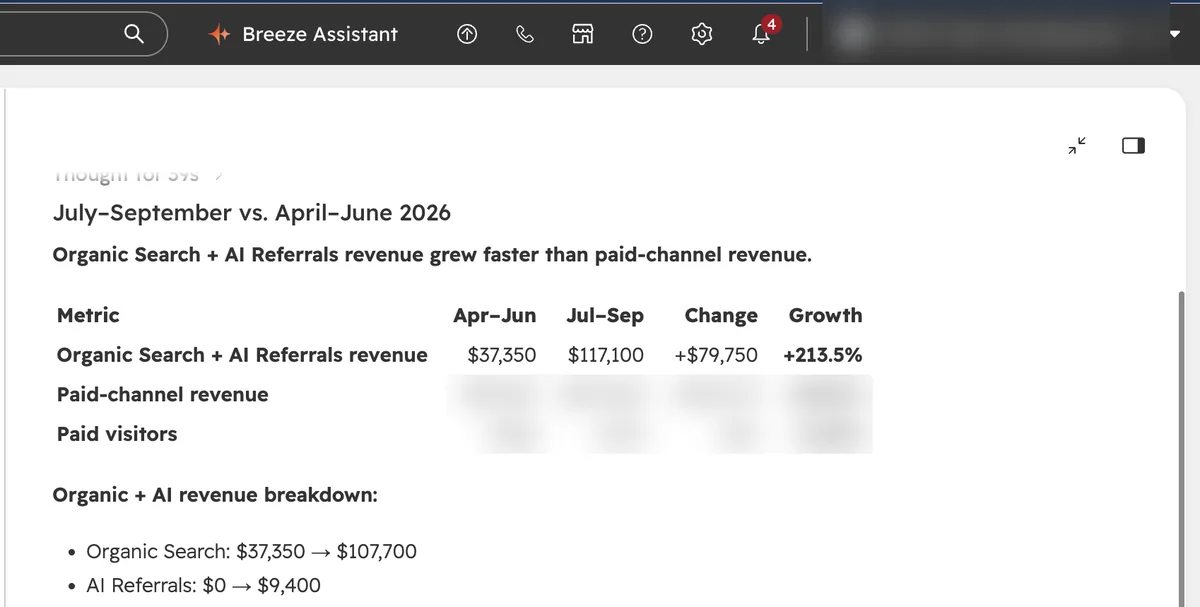
The same principle runs through our B2B work: measure the outcome the business is paid for, in the CRM, by source. For a US B2B company (name withheld), HubSpot credited organic search and AI referrals with more closed-won revenue in the third quarter of 2026 than in the second.
A US B2B company (name withheld). Closed-won HubSpot revenue credited to Organic Search and AI Referrals: $37,350 (Apr–Jun 2026) to $117,100 (Jul–Sep 2026). AI Referrals alone: $0 to $9,400.
 Open the screenshot at full size ↗
This is organic and AI revenue, not a Google Ads result, and one quarter against another is not a controlled test. It shows the standard we hold paid search to: a dated closed-won number by source, from the CRM. Our write-up of that CRM result explains the method, and our case studies show the rest of our work with dates.
Questions buyers ask.
Where can I find the Google Ads conversion tag?
Go to Goals → Summary, open the conversion action and choose its tag setup to see the event snippet, or the conversion ID and label for Google Tag Manager. GA4 imports and codeless actions have no separate snippet.
Should I count every conversion or one?
One, for leads. Google’s counting guidance notes that only one unique lead per ad click is likely to add value, which is what “One” counts. Website actions default to “Every”, so check each lead action.
Should I import GA4 key events or use the Google Ads tag?
Either works, and you can run both, but only one source per enquiry should be primary. The Google Ads tag reports faster and attributes to the click; GA4 imports can take up to 24 hours and arrive as secondary if created from GA4.
How long until conversion data is complete?
New tags can take a day or two to show as recording. For performance reviews, Google advises a date range that ended at least 30 days ago, longer with a longer conversion window, because conversions are dated to the click and arrive late.
Do I need enhanced conversions for leads?
If you want bidding to learn from qualified leads rather than form fills, yes. It is Google’s current way to send CRM outcomes back, and since June 2026 its main upload route is Data Manager. In the UK and EEA it depends on consent for ad_user_data.
Sources, opened 25 November 2026: Google Ads Help on setting up web conversions, how Google Ads tracks website conversions, Tag Assistant troubleshooting, tracking status, sitewide tagging, conversion counting, conversion windows, primary and secondary actions, conversion rate, days to conversion, GA4 imports, enhanced conversions for leads, configuring the Google tag for it, upgrading offline imports, high-quality leads, consent mode, EEA consent updates and tag gateway; Google Ads Developer Blog, 15 May 2026; Google EU user consent policy; LocaliQ search advertising benchmarks, 1 June 2026 (vendor data). Search demand for “google ads conversion tracking”: Google search data via DataForSEO, US and UK, November 2026. Client results: a US B2B company (name withheld), HubSpot, Q3 vs Q2 2026. Mock-up, example and defaults are illustrative.