
The short answer.
Server-side tracking sends one stream of events from the visitor’s browser to a tagging server on your own domain, and that server forwards what each platform needs to Google Analytics, Google Ads, LinkedIn or Meta. Google’s documentation describes the server container as one that “runs on a server that you control”. It pays for itself in B2B when paid media spend is meaningful, two or more ad platforms optimise on your conversions, and your CRM already sends qualified stages back. It does not pay when the real problem is broken forms, missing consent or a CRM that cannot tell a sales lead from a job applicant.
The minimum running cost on Google Cloud is modest: Google’s own setup guide puts each server at about $45 a month and recommends at least two. The real cost is the setup and the upkeep, and the real risk is spending it before the cheaper fixes in chapter 7. If you are still working out why your analytics and your inbox disagree, start with our afternoon audit for GA4 lead numbers; this guide assumes the basics are counted correctly and asks whether a server is the next step.
Prolinkage diagram. Based on Google Tag Manager’s server-side documentation and the UK ICO’s storage and access technologies guidance (final version, 29 April 2026), both read on 25 November 2026.
Client-side and server-side, side by side.
The difference between client-side and server-side is where the work happens. Client-side means the visitor’s device does it: the browser downloads a script from each vendor, runs it, sets cookies with JavaScript and sends data straight to that vendor. Server-side means the browser sends its data to a machine you run, and that machine processes it (the “server-side processing” people search for) before anything leaves for a vendor.
Server-side Google Tag Manager is the most common way to do this. You keep your normal web container, add a server container, host it (usually on Google Cloud Run or with a managed host), and point it at a subdomain or path on your site. Google’s introduction puts the control point plainly: “only you have access to the data in the server until you choose to send it elsewhere.”
| Question | Client-side tags | Server-side tagging |
|---|---|---|
| Where tags run | In each visitor’s browser | On a tagging server you host, plus a lighter browser tag |
| Who sees raw data first | Each vendor, directly | You; then each vendor gets what you forward |
| Cookies | Mostly set by JavaScript, which Safari limits | Can be set by your server in a first-party response |
| Ad blockers | Block well-known vendor domains and scripts | Harder to block when served from your own domain, though not immune |
| CRM events | Not possible from the browser | The same server can receive qualified stages from the CRM |
| Running cost | None beyond the tools | Hosting, plus setup and someone to maintain it |
| Consent | Required for non-essential tags | Required in exactly the same cases |
What breaks in the browser.
Three things erode browser-based tracking, and B2B feels each of them more than ecommerce does because the gap between first visit and enquiry is long.
Safari shortens cookies
WebKit, the engine behind Safari on every iPhone, documents that its Intelligent Tracking Prevention “deletes all cookies created in JavaScript and all other script-writeable storage after 7 days” without interaction with the site. When ITP detects that a visitor arrived through a decorated link, such as one carrying a click ID, it caps cookies created in JavaScript on that landing page at 24 hours. For a Safari user who clicks a LinkedIn ad on a Monday and fills in your form three weeks later, the browser has usually forgotten the click.
WebKit, Tracking Prevention in WebKit, read 25 Nov 2026. Bars are illustrative of order, not to scale. Any cookie can still be cleared by the visitor.
Blockers and privacy browsing
Ad blockers and privacy extensions recognise vendor script domains. Safari’s Link Tracking Protection already strips known click identifiers in Private Browsing, Mail and Messages. A July 2026 review of Safari 27 beta code, published by a server-side hosting vendor and reported by the trade site PPC Land, found new rules that block Microsoft Advertising’s tracking endpoint by IP address and restrict LinkedIn’s Insight Tag under fingerprinting protection. Treat that as an early signal from an interested party, not a settled fact, but note who it hits: the two platforms many B2B advertisers rely on.
Your own site gets heavier
Each vendor script adds weight. Google said in 2021 that server-side tagging can reduce page load time, citing one customer who improved load time by 7%. That is a vendor figure from a single case; the size of the gain depends on how many scripts you actually remove.
What a server fixes, and what it cannot.
A server makes data you already collect more durable and easier to control. It cannot create data that never existed, and it cannot judge which leads are real.
| Problem | Does server-side fix it? | What actually fixes it |
|---|---|---|
| Safari forgets the ad click before the enquiry | Largely, if the server sets cookies on your own domain | Same-origin setup; also store the click ID in a hidden form field |
| Blockers drop analytics hits | Partly | First-party serving; accept some loss |
| Ad platforms optimise on junk leads | No | Send qualified CRM stages back (offline conversions) |
| GA4 counts each enquiry twice | No; it forwards the duplicate faithfully | Fix the trigger, then reconcile with the CRM |
| Form spam inflates conversions | Only if you add filtering rules on the server | Spam controls on the form and CRM qualification |
| Visitors decline consent | No | Consent Mode and honest modelling |
| Vendors receive more data than you intend | Yes; this is its strongest benefit | Server rules that remove fields before forwarding |
Read the third row twice. For most B2B accounts we review, the bigger loss is not the clicks a browser forgets; it is that Google Ads and LinkedIn are told every form fill is equally valuable. Our guide to offline conversion tracking for B2B SaaS covers sending SQLs, opportunities and won deals back, and our piece on cost per lead versus cost per qualified opportunity explains why that signal matters more than volume.
Why B2B arithmetic is different.
Server-side vendors usually make the case with ecommerce numbers: thousands of purchases a day, each with a value. B2B lead generation differs in three ways.
- Volumes are small. At 40 paid enquiries a month, recovering 10% is four enquiries. Smart Bidding will notice, but slowly, and only if those four are real buyers.
- The value appears later. The form fill is worth little on its own. The opportunity a month later is the event that should train bidding, and it lives in your CRM, not the browser.
- The lag is long. A buyer who reads three articles in March and enquires in May is exactly the person Safari’s caps forget. That argues for durable first-party identifiers, but only once the CRM can use them.
The practical test is a ratio you can calculate this afternoon: paid-media enquiries recorded in your CRM last quarter, against conversions reported by each ad platform for the same period. If the platforms report fewer than the CRM, signal is being lost in the browser and a server can help. If they report more, you have a duplication or spam problem a server will happily forward, and our guide to tracking website leads from first visit to CRM is the better place to start.
What it costs to run.
Hosting is the visible cost and the smallest one. Google’s Cloud Run setup guide, read on 25 November 2026, states that “each server costs approximately $45 /month (USD)” for one virtual CPU and 0.5 GB of memory, and recommends “a minimum of 2 instances to reduce the risk of data loss in case of a server outage”. Google estimates 2 to 10 servers handle 35 to 350 requests a second; most B2B sites stay at the lower end. You also need a preview server for testing, and logging can add charges.
Managed hosts sell the same container as a subscription priced by request volume. Either way, the larger lines in the budget are people.
| Line | Typical size | What it buys |
|---|---|---|
| Hosting (Cloud Run, 2 servers) | About $90 a month before preview server and logging (Google’s estimate) | Redundancy so events are not lost in an outage |
| Domain and CDN routing | Small, if your CDN can forward a path | Same-origin cookies that Safari does not cap at 7 days |
| Initial build | The largest one-off cost: tags, clients, consent, deduplication, testing | A working container that mirrors your current tags |
| Maintenance | Hours every month | Template updates, new platforms, broken-event alerts |
| Benefit: durable signal | Varies by Safari share and ad spend | Ad clicks still matched to enquiries weeks later, on Safari too |
| Benefit: data control | Hard to price, real for regulated buyers | Fields removed before vendors see them |
Set that against the spend it protects. On Google’s figures, the hosting floor is roughly $1,080 a year. If your annual paid media is $20,000 and a fifth of the conversion signal behind it is lost, the server is protecting the optimisation of about $4,000 of spend. That can pay, but only once you add the build and upkeep, which is why chapter 10’s checker weighs maintainer time as heavily as spend. For a fuller picture of Google Ads budgets, see what Google Ads costs B2B companies in 2026.
The cheaper steps to take first.
Several fixes recover the same signal for less, and each makes a later server more valuable. Take them in this order.
- 01 · COUNTOne key event per real enquiry, reconciled with the CRM
- 02 · KEEPClick IDs and UTMs saved in hidden form fields
- 03 · RETURNEnhanced conversions for leads and CRM stages sent back
- 04 · ROUTEGoogle tag gateway on your own domain
- 05 · SERVEServer-side container for every platform
Each rung is useful alone; the server is the last, not the first.
Enhanced conversions for leads. Google describes it as “an upgraded version of offline conversion import that uses user-provided data”: your site sends a hashed email address with the conversion, and you later upload qualified stages that Google matches back to the click. Google still asks you to include click IDs “whenever possible”, and notes that from 15 June 2026 these uploads move to its Data Manager API. Our sibling guide to Google Ads conversion tracking for lead generation covers the setup.
Google tag gateway. This serves Google’s tags from your own domain through your CDN or load balancer, with no change to the tags on your pages. Google reports that advertisers who configured it “saw an 11% uplift in signals”, measured on its global data for 9–16 April 2025. That is Google’s own figure about Google’s product, so treat it as a ceiling to test, not a forecast. Google also says to complete both the gateway and server-side tagging “for the most durable tagging setup”; the gateway covers Google tags only.
Platform conversion APIs from the CRM. LinkedIn’s Conversions API and Meta’s both accept events from your server, including offline stages. Many CRMs can send them directly, without a tagging server in between.
Consent does not move.
Some vendors sell server-side tracking as a way around cookie banners. In the UK it is not. The ICO’s final guidance on storage and access technologies, published on 29 April 2026, says that regulation 6 of PECR “applies in both a ‘client-side’ and ‘server-side’ context”, and that website operators using a server-side tag manager “must inform the user about third parties”. If your browser tag still stores or reads anything on the device to feed the server, the consent rules are unchanged.
In the US there is no single federal equivalent, but state privacy laws and your own published policy still govern what you collect and share. For both markets: a server gives you more control over what vendors receive, which makes compliance easier to show. It does not change what needs permission. With Google’s Consent Mode configured, Google said in 2021 that tags in the server container respect the consent choices made on the site; non-Google tags need their own consent conditions, and you should test with consent declined before going live. Our sibling guide to Consent Mode v2 for B2B lead forms walks through that test.
What a sound B2B setup looks like.
If the checker says yes, four decisions separate a durable container from an expensive copy of your old tags.
1. Serve it from your own origin
Google calls serving the container from a path on your site, such as /metrics, “a best practice”; it needs your CDN or load balancer to forward requests. A subdomain is simpler but needs care: WebKit says it detects “third-party CNAME cloaking and third-party IP address cloaking” and caps cookies set in those responses to 7 days. The default hosting domain cannot set server cookies at all.
2. Deduplicate browser and server events
Most teams run browser and server events together for a while. Meta deduplicates only when the pixel’s eventID matches the server’s event_id, the event names match, and both arrive within 48 hours. Generate the ID once, when the form submits, and pass it to both.
3. Strip before you forward
Write down which fields each platform gets. Names, phone numbers and the message box from an enquiry form rarely need to reach an ad platform; hashed emails for matching sometimes do, with consent.
/metrics. One entry point; everything else reads from it.generate_lead, consent required. Click ID from the first-party cookie.generate_lead and on sql from the CRM webhook. Qualified stage, not just the form.Prolinkage example of a typical layout, not a client configuration.
4. Monitor it like infrastructure
A broken client-side tag shows up in the browser. A broken server tag fails quietly. Set an alert on a daily count of generate_lead received against CRM enquiries, and check it after every site release.
Is server-side worth it for us?
Answer seven questions. The checker weighs spend, platforms, Safari share and your measured gap against the work, using Google’s hosting estimate. Nothing you enter is sent anywhere.
Enter your monthly spend to see a verdict.
A rule of thumb, not a quote. Hosting floor from Google’s Cloud Run guide: about $45 a server a month, two servers recommended.
The gap figure is the one that matters most and the one most teams guess. Measure it: last quarter’s paid enquiries in the CRM against each platform’s reported conversions, after removing spam and duplicates.
What this looks like in our work.
We set up measurement in GA4, Google Tag Manager and the CRM before we recommend any server. The review below comes from a studio owner, not a B2B company, but the problem is the one most B2B teams bring us: tracking that looked fine and was not.

“Their expertise in setting up precise conversion analytics via GTM allowed us to correct our earlier tracking errors and gain clear insights into our marketing performance.”
Explore our case studies
The record every tracking change is checked against is the CRM. For a US B2B company (name withheld), HubSpot credited organic search and AI referrals with more closed-won revenue in the third quarter of 2026 than in the second.
A US B2B company (name withheld). Closed-won HubSpot revenue credited to Organic Search and AI Referrals: $37,350 (Apr–Jun 2026) to $117,100 (Jul–Sep 2026). AI Referrals alone: $0 to $9,400.
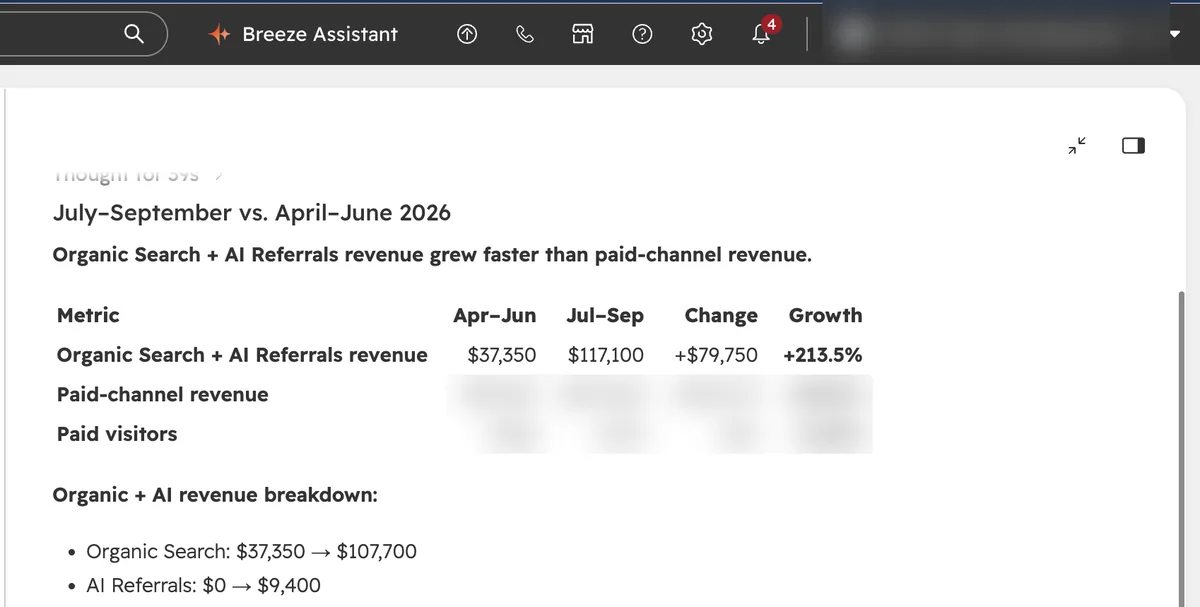 Open the screenshot at full size ↗
One quarter against another is not a controlled test, and this result did not depend on a tagging server. It shows the standard we hold tracking to: a source that can be followed to a deal. Our write-up of that CRM result explains the method and its limits.
Questions buyers ask.
What is the difference between client-side and server-side tracking?
Client-side tracking runs vendor scripts in the visitor’s browser, which send data straight to each vendor. Server-side tracking sends one stream from the browser to a server you control, which processes it and forwards what each platform needs. The server gives you control and more durable first-party cookies; it does not remove consent requirements.
What is server-side Google Tag Manager?
A Tag Manager container that runs on a server you host, usually Google Cloud Run or a managed host, not in the browser. Your web container sends events to it, and server tags forward them to GA4, Google Ads, LinkedIn, Meta and others.
How much does server-side tracking cost?
Google’s Cloud Run guide estimates about $45 a month per server and recommends at least two, so hosting starts near $90 a month before a preview server and logging. The larger costs are the initial build and monthly maintenance.
Does server-side tracking get around cookie consent?
No. The UK ICO’s April 2026 guidance says regulation 6 of PECR applies in both client-side and server-side contexts. In the US, state privacy laws and your own privacy policy still apply. A server makes it easier to control and show what you share.
Is server-side tracking worth it for a small B2B company?
Usually not as a first step. With modest ad spend and a few dozen enquiries a month, sending qualified CRM stages back to the ad platforms and using Google tag gateway recover more value for less work. Revisit it when spend grows or you add a second ad platform.
Sources: Google Tag Manager, An introduction to server-side tagging; Cloud Run setup guide; Custom domain guide; Google tag gateway for advertisers (developer page and Google Ads Help); Google Ads Help, About enhanced conversions for leads; Google blog, server-side tagging (23 Sep 2021); WebKit, Tracking Prevention in WebKit; ICO, What are storage and access technologies (final guidance 29 Apr 2026); Meta, Deduplicate Pixel and Conversions API events; LinkedIn, Conversions API overview (updated Aug 2026); PPC Land, report on Safari 27 beta (Jul 2026). All accessed 25 Nov 2026. Client result: a US B2B company (name withheld), HubSpot closed-won revenue by original source, Jul–Sep vs Apr–Jun 2026. Review: as published on prolinkage.com.