
The short answer.
HubSpot attribution reporting credits contacts, deals and closed-won revenue to the interactions a person had before converting: ad clicks, page views, form submissions, email clicks, meetings and calls. Contact create reports come with Marketing Hub Professional; deal create and revenue attribution need Marketing Hub Enterprise. HubSpot counts people and deals from its own tracking cookie. GA4 counts events in sessions, and ad platforms count actions against their own clicks and views. That is why the numbers never match exactly, and why they should not be forced to.
The aim is a report in which each number has one owner. HubSpot owns pipeline and revenue by source, GA4 owns on-site behaviour, and each ad platform owns its own delivery and bidding signals. The gaps between them are then explained in writing rather than argued about each month. Setting this up is the core of our conversion tracking and analytics work. For how leads are captured and passed to the CRM in the first place, see our guide to website lead tracking; this guide starts once leads are in HubSpot.
Illustrative buyer, Prolinkage example. Rules from LinkedIn’s conversion window help (90-day click, 90-day view default), Google Ads’ conversion data help (reported by click date), GA4 attribution settings and HubSpot’s traffic source documentation, all read 25 November 2026. Every answer is correct under its own rules.
Four ledgers, four rules.
Before anyone changes a setting, write down what each system counts. Most of the monthly “which number is right?” argument disappears once the table below is printed and agreed.
| Question | GA4 | Google Ads | LinkedIn Ads | HubSpot |
|---|---|---|---|---|
| Unit counted | Key events (actions) | Conversions (actions, one or every per click) | Conversions; repeat conversions by one member in the window count once | Contacts, deals and closed-won revenue (people and records) |
| Date used | When the event happened | The ad click date, unless you use the “by conv. time” columns | Not stated in LinkedIn’s help; check your export | Contact create date, deal create date or deal close date |
| Default window | 90 days for most key events; 30 for acquisition events | Set per conversion action | 90-day click, 90-day view | At least a year of interactions where available |
| Credit rule | Data-driven or last click; direct never gets credit | Credits Google Ads interactions | Last touch: the most recent click or view | The model you pick in the report |
| Credits ad views without a click? | Only engaged-view key events (3-day default window) | Yes, but view-through conversions sit in their own column, outside “Conversions” | Yes, view-through | No |
Two rows cause most of the gap in B2B accounts. The unit row: an ad platform counts ten form submissions from one keen visitor as ten conversions, while HubSpot counts one contact. HubSpot’s own help page on mismatched ad data makes exactly this point. The window row: LinkedIn’s default credits a form fill to an ad someone merely scrolled past up to 90 days earlier, which HubSpot can never see.
What HubSpot attribution covers in 2026.
HubSpot has three attribution report types, renamed in its current help pages (updated 18 August 2026):
- Contact create attribution: which sources and interactions created contacts. Marketing Hub or Content Hub Professional or Enterprise.
- Deal create attribution: which interactions led to deals being created. Marketing Hub Enterprise.
- Deal revenue attribution: how closed-won revenue is shared across interactions. Marketing Hub Enterprise.
The interactions that count are switched on in Settings › Tracking & Analytics › Attribution. Page views, form submissions, CTA clicks, marketing email clicks, connected calls, meetings, sales email replies, conversations, ad clicks and social post clicks are on by default. Media plays, marketing event registration and attendance, sequence enrolment and custom events are off until you turn them on. Changing them means reprocessing existing reports, which HubSpot says can take up to two days.
The conditions that silently drop revenue
- A deal needs at least one associated contact. Without one, HubSpot says the revenue “will not be attributed to any interactions”.
- Revenue reports include only closed-won deals with an Amount, a Create date and a Close date.
- If a deal was created before its contacts, the W-shaped and full-path models return nothing for it.
- On very large deals, HubSpot samples interactions (it processes up to 100,000 per deal) and favours those near key conversion moments, so repeated page views may be missing from drill-downs.
Deals entered by sales from a phone call, with no contact or an empty Amount, simply do not appear. In our audits, that one gap often explains more “missing” revenue than any model choice.
A note on the model list
HubSpot’s documentation is mid-change. The report-building guide lists First Touch, Last Touch, Linear, Time Decay and Empirical, and says Empirical “replaces the U-shaped, W-shaped, J-shaped, and Inverse J-shaped models”, weighting interaction types from your own historical data. The definitions page (updated 20 October 2026) still documents the shaped models. Check which list your account’s report builder shows before you put a model name in a board pack.
Choosing a model.
The model does not change how much revenue you won. It changes which channel gets the credit. The chart applies HubSpot’s published rules to one illustrative deal with four interactions: a Google ad click, an organic visit with a form fill (lead creation), a nurture email click 14 days later, and a booked meeting (deal creation) a week after that.
Google ad click Organic visit + form Email click Meeting
Illustrative deal. Rules from HubSpot’s attribution definitions (updated 20 Oct 2026): U-shaped 40/40 with 20 shared; W-shaped 30/30/30 with 10 shared; time decay halves credit every 7 days, measured here back from the meeting (ages 32, 21, 7 and 0 days). Empirical is not shown: it is fitted to your own data.
Paid search gets anywhere from nothing to 100% of the same deal. That is why a model choice must be agreed before a budget conversation, not during one.
What we recommend for most B2B teams
- Budget questions (which channel creates pipeline): a U-shaped or W-shaped view if your account still offers it, otherwise Linear, with First Touch alongside it.
- Content questions (which pages help deals close): the deal revenue report by asset type with Linear, filtered to closed-won.
- Empirical: worth testing once you have a few hundred closed deals. On thin data a fitted model mostly reflects noise.
- Last touch on its own: avoid it for B2B. The last interaction before a deal is usually a meeting or a sales email, so marketing gets no credit.
Fix the inputs first.
Attribution reports are only as good as the interactions HubSpot recorded. Five inputs decide that, and each can be checked in an afternoon.
1. The tracking code on every page an ad or email links to
HubSpot pages include it by default. A WordPress or Webflow site, a separate careers or docs subdomain, or a booking tool on another domain may not. Check the landing pages of every live ad first.
2. Forms HubSpot can see
HubSpot’s ads documentation requires HubSpot forms, pop-up forms, or non-HubSpot forms sent through the Forms API with the page URL and the HubSpot tracking cookie. A form posted to HubSpot without the cookie creates a contact with no browsing history, so every ad click and page view before the form drops out of attribution.
3. Ad auto-tracking switched on before the campaign runs
To credit a contact to a specific ad, the click URL needs HubSpot’s network-specific hsa_ parameters. HubSpot says manual UTMs alone may give the source but not the ad, and that tracking “does not work retroactively”.
4. UTM values both tools read the same way
GA4 and HubSpot classify traffic with different rules. Here are the combinations we see most often in B2B accounts:
| Link tagged as | GA4 channel | HubSpot source | Verdict |
|---|---|---|---|
| utm_source=linkedin, utm_medium=paid_social | Paid Social | Paid social | Use this |
| utm_source=linkedin, utm_medium=social on an ad | Organic Social | Organic social | Paid spend reported as organic |
| Google Ads auto-tagging (gclid), no UTMs | Paid Search | Paid search (valid gclid) | Use this |
| utm_medium=email on a newsletter | Email marketing | Use this | |
| utm_medium=partner on a partner’s site | Unassigned, unless the source is a known site | Other campaigns | Agree one value and document it |
Sources: GA4 default channel group definitions and HubSpot’s traffic source rules (updated 1 August 2026). HubSpot checks 15 rules in a fixed order, so a “cpc” or “paid” medium with a social source is classed as Paid social before the later rule that turns “cpc” into Paid search is reached.
5. Original source on deals
Deals and companies mirror the traffic source properties of their associated contacts. If sales adds the champion to the deal but never the person who first filled in the form, the deal can inherit the wrong original source. Make associating the first enquirer a required step when a deal is created.
HubSpot and Google Ads.
Three differences explain most of the gap between Google Ads and HubSpot.
- Dates. Google Ads reports a conversion on the date of the click, so last week’s click that converts this week lands in last week. HubSpot reports on the contact create or deal close date. To compare like with like, Google points to the “All conv. (by conv. time)” column for comparisons with third-party systems.
- Counting. With “every” counting, one visitor’s repeat downloads are several conversions. HubSpot counts one contact. For lead generation, set your primary lead actions to “one”.
- Who gets credit. HubSpot’s Last ad interaction report needs the contact to be created in the same session as the ad click. A buyer who clicks today and enquires next week from organic search is a Google Ads conversion, but not a HubSpot “last ad interaction” contact. Use HubSpot’s First ad interaction or All ad interactions report when you compare.
Sending HubSpot stages back to Google Ads
HubSpot can sync lifecycle stage changes, such as SQL or Opportunity, to Google Ads as conversion events. HubSpot’s guide (updated 30 October 2026) sets out the limits:
- A contact needs a Google click ID or shared contact data (email, phone or address).
- Only stage changes after the event is created count.
- Events can’t use Enhanced Conversions through a manager (MCC) account.
- The “Use the Deal amount” option has gone, so the value is fixed. Real deal values need a custom build on Google’s offline conversion import.
Our guide to offline conversion tracking for B2B covers that build step by step. The tag-side setup is in our new piece on Google Ads conversion tracking for lead generation.
HubSpot and LinkedIn Ads.
LinkedIn is where the gap is usually widest, and the reasons are structural.
- View-through. LinkedIn’s help page gives the default conversion window as 90-day click and 90-day view, and credits the most recent ad click or view. HubSpot has no record of a view, so every view-through conversion is a LinkedIn number with no HubSpot match.
- Cookies. LinkedIn says Campaign Manager collects website conversions through a third-party cookie system, which browsers such as Safari block. That pushes LinkedIn’s number down, at the same time as view-through pushes it up.
- Lead Gen Forms. Native LinkedIn forms synced to HubSpot arrive as contacts already credited to the ad, with no cookie needed. That is often the cleanest LinkedIn data you have.
- Window changes. A changed window applies from that date forward only, so note it in the report.
The practical rule: compare HubSpot contacts with LinkedIn click conversions, and report view-through separately as an influence measure. If paid social matters to your board, add a required “How did you hear about us?” field. It catches what neither system can see. Our play on self-reported attribution in the CRM shows the field set-up. For choosing between the two channels, see Google Ads vs LinkedIn Ads for B2B.
HubSpot and GA4.
GA4 and HubSpot answer different questions, so match them only where the questions overlap.
- Scope. GA4’s attribution model applies to key event reports that use event-scoped dimensions such as Source and Default channel group. Session-scoped dimensions (Traffic acquisition) and first-user dimensions (User acquisition) follow their own rules. HubSpot’s Original source is closest to GA4’s first user channel; Latest source is closest to the session channel.
- Models. GA4 now offers data-driven, paid and organic last click, and Google paid channels last click; first click, linear, time decay and position-based were removed in November 2023. Direct visits never receive credit. HubSpot will credit Direct traffic.
- Windows. GA4’s default lookback is 90 days for most key events and 30 for acquisition events. Changes apply from the day you make them, while changing the model also rewrites history.
- Consent. In the UK and EU, a declined banner can stop one tool and not the other, depending on how each is tagged. Our guide to Consent Mode v2 for B2B lead forms covers that.
If GA4’s form key events don’t match the number of new HubSpot contacts in the first place, fix that before you compare attribution. Our afternoon audit for GA4 lead numbers walks through duplicate events, thank-you pages and iframes. AI assistants are a further source of mismatch. HubSpot now has an AI Referrals source with the platform domain as the drill-down, while GA4 needs a custom AI channel to count it well. We cover that pairing in AI referral traffic to pipeline.
The reconciled report.
A reconciled report does not show one number per channel. It shows the right number for each question, names the system that owns it, and explains the gap beside it.
| Question | Owner | Number | Gap note |
|---|---|---|---|
| Revenue from closed-won deals, by original source | HubSpot revenue report, Linear | Paid search 31% | Model agreed in Q1; First Touch shown alongside |
| New qualified leads, by source | HubSpot contact create, lifecycle SQL | 42 SQLs | Counts people, not form fills |
| Google Ads leads, for bidding | Google Ads, by conv. time | 58 | Higher than HubSpot: one-per-click not yet set on the brochure download |
| LinkedIn leads | Campaign Manager, click-through only | 19 | Plus 27 view-through, reported as influence |
| On-site behaviour of organic visitors | GA4, session channel | Engagement rate | Not compared with CRM counts |
Mock-up with made-up values. The gap note is the column most reports leave out, and the one that ends the monthly argument.
- 01 · DEFINEOne owner system per question
- 02 · INPUTSTracking code, forms, hsa_ tags, UTMs
- 03 · RECORDSContacts on deals; amount and dates filled
- 04 · MODELAgree it before the budget meeting
- 05 · EXPLAINA written gap note for every pair
Skip a step and the report becomes an argument again.
Keep the monthly page short. Our monthly reporting template shows the layout we use. Our note on cost per lead versus cost per qualified opportunity explains why the SQL row matters more than the lead row.
The gap checker.
Enter one month’s conversions from an ad platform and the contacts HubSpot credits to that platform for the same month. Tick what applies. The checker sizes the gap and lists the causes to rule out first. Nothing you enter is sent anywhere.
Enter both numbers to size the gap.
Causes are listed from the rules in chapters 6 and 7. This is a triage aid, not an audit.
Google’s own help expects Google Ads and Analytics to differ by up to about 20% because of model differences. No vendor publishes an equivalent figure for HubSpot. So use 20% as a working threshold, not a benchmark. Above it, find the cause before you accept the gap.
What this looks like in our work.
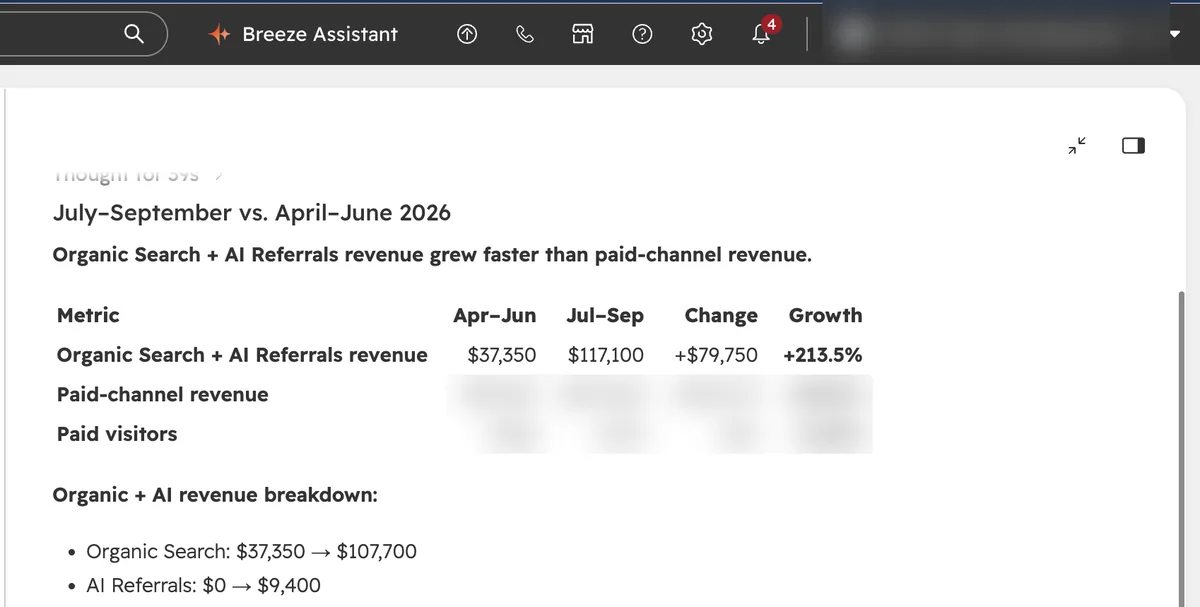
For a US B2B company (name withheld), we set HubSpot up so organic search and AI referrals were recorded as separate original sources and carried through to closed-won deals. Then we read the revenue report one quarter against the previous one.
A US B2B company (name withheld). Closed-won HubSpot revenue credited to Organic Search and AI Referrals: $37,350 (Apr–Jun 2026) to $117,100 (Jul–Sep 2026). AI Referrals alone: $0 to $9,400.
 Open the screenshot at full size ↗
Read it for what it is. This is an original-source view, not a multi-touch model, and one quarter against another is not a controlled test. It shows that the plumbing works: every deal has a contact, a source and an amount. Our write-up of that CRM result sets out its limits in full, and more dated results are on our case studies page.

“Their expertise in setting up precise conversion analytics via GTM allowed us to correct our earlier tracking errors and gain clear insights into our marketing performance.”
Where this does not apply
- Fewer than about 20 closed deals a quarter: multi-touch models move with every deal. Report original source on the deal plus a “how did you hear” field, and revisit once volume grows.
- No Marketing Hub Enterprise: deal and revenue attribution reports are not available. Copying the original source onto the deal and building a standard deal report covers most needs.
- Questions of “would we have won it anyway?”: attribution shares credit and cannot measure lift. That needs a holdout or geo test.
Questions teams ask.
Does HubSpot have attribution reporting on Professional?
Partly. Marketing Hub or Content Hub Professional includes contact create attribution. Deal create and deal revenue attribution need Marketing Hub Enterprise, according to HubSpot’s help pages updated in 2026.
Why don’t HubSpot and Google Ads conversions match?
Google Ads counts actions against its own clicks and reports them on the click date. HubSpot counts contacts from its tracking cookie, on the date they were created. Repeat conversions, the “same session” rule in the Last ad interaction report and forms HubSpot cannot see explain most gaps.
Which HubSpot attribution model should a B2B company use?
For channel budgets, use a model that credits both the first touch and the lead conversion (U-shaped or W-shaped where available, otherwise Linear), with First Touch beside it. Avoid Last Touch on its own. In B2B it usually credits a sales meeting.
Can HubSpot track LinkedIn view-through conversions?
No. HubSpot records interactions it can see, such as ad clicks and visits, so impressions are not on the contact record. Report LinkedIn view-through conversions separately as an influence measure.
Should GA4 or HubSpot be the source of truth?
Both, for different questions. HubSpot should own leads, pipeline and revenue by source. GA4 should own on-site behaviour and content engagement. Ad platforms should own the signals their bidding uses. Write down which system owns which question and explain the gaps.
Method and sources: HubSpot Knowledge Base, “Create attribution reports” (updated 18 Aug 2026), “Understand attribution reporting” (20 Oct 2026), “Select interaction types” (10 Sep 2026), “Ads attribution in HubSpot” (13 Aug 2026), “Understand HubSpot Ads contact attribution and ad network conversions” (16 Nov 2026), Google Ads conversion events sync (30 Oct 2026), traffic source properties (4 Aug 2026) and web traffic source rules (1 Aug 2026); Google Analytics Help on attribution models, attribution settings, acquisition reports and default channel groups; Google Ads Help on conversion tracking data; LinkedIn Marketing Solutions Help on conversion windows, the attribution model and third-party comparisons. All read 25 Nov 2026. Model chart and buyer path are illustrative. Client result: HubSpot, closed-won by original traffic source, Jul–Sep vs Apr–Jun 2026. Review as published on prolinkage.com. Engagement terms confirmed by Prolinkage, 13 Nov 2026.