
The short answer.
Consent Mode v2 is Google’s way of passing a visitor’s cookie choice to Google tags through four signals: ad_storage, analytics_storage, ad_user_data and ad_personalization. Google’s EU user consent policy covers visitors in the European Economic Area, the UK and Switzerland, and Google Ads Help says that to keep using its measurement, personalisation and remarketing tags for EEA users, you must collect consent and share the signals with Google. Your banner collects the consent; Consent Mode tells Google what the visitor chose.
In basic mode, Google tags wait for the banner, and a visitor who declines sends Google nothing. In advanced mode, tags load with every signal set to denied and send cookieless pings, which Google can use for an advertiser-specific model. Either way, the enquiry still lands in your inbox and CRM. What changes is how many your analytics and ad platforms can count, so report leads from the CRM.
Prolinkage diagram, drawn from Google’s consent mode overview and Google Ads Help, both read on 25 November 2026. “Ignores” assumes your default for that region is denied.
This guide covers the consent layer only. For tracing a lead from first visit to closed deal, see website lead tracking.
The four signals, and what “denied” switches off.
Version 2 added two signals, which Google describes as consent “for sending user data to Google for advertising purposes” (ad_user_data) and consent “for personalized advertising” (ad_personalization). Here is what each one stops when denied.
| Signal | When denied (Google’s description) | What it means for a lead form |
|---|---|---|
analytics_storage | First-party analytics cookies are not read or written; cookieless pings still go to Google Analytics | The GA4 key event for the enquiry is not tied to a visitor or session you can see |
ad_storage | No new advertising cookies may be written | The Google Ads click ID is not stored in a cookie, so the conversion tag cannot match the form fill to the click in the usual way |
ad_user_data | Use of personal data for online advertising is disabled | Enhanced conversions for leads should not send the hashed email for that visitor |
ad_personalization | Personalised advertising, including remarketing, is disabled | The visitor does not join your remarketing lists |
Two details are easy to miss. Google’s consent page says ad_user_data is the signal “required for measurement use cases, such as enhanced conversions”, so it is not only about audiences. And both ad_user_data and ad_personalization must be granted before personalised advertising works. For data you upload rather than tag, Google’s Customer Match documentation says that from March 2024 EEA records need both consent fields set to granted.
Basic or advanced: the choice in lead terms.
| Basic | Advanced | |
|---|---|---|
| Google tags load | Only after the visitor interacts with the banner | When the page opens, with defaults set (usually denied) |
| If the visitor declines | “No data is transferred to Google at all”, not even the consent status | Consent state and cookieless pings, including a ping when a key event happens |
| If the visitor ignores the banner | Nothing is sent | The denied defaults apply, so pings only |
| Google Ads conversion modelling | A general model | An advertiser-specific model |
| GA4 behavioural modelling | Not available: Google requires tags to load before the consent dialog | Available if the property meets Google’s volume thresholds (chapter 11) |
Google Ads Help lists what a cookieless ping can contain: a timestamp, user agent, referrer, whether ad-click information was in the URL, the consent state and a random number. Your privacy notice has to cover that if you choose advanced mode, so the decision belongs with whoever owns the policy, not only marketing.
- 01 · TRAFFICMeaningful visits from the UK, EEA or Switzerland?
- 02 · ADSGoogle Ads bidding on form fills or CRM stages?
- 03 · VOLUMEEnough clicks for modelling (700 in 7 days per country)?
- 04 · LEGALDoes your adviser accept pings before a choice?
- 05 · DECIDEYes to all four: advanced. Otherwise: basic, and report from the CRM.
A rule of thumb from our own set-ups, not a legal test. Step 04 always overrides the others.
One enquiry, four consent states.
Most Consent Mode guides are written for online shops. On a B2B site the conversion is a form, and its value arrives weeks later in the CRM. Here is one enquiry from a UK visitor, in each state.
| Visitor’s choice | Inbox and CRM | GA4 key event | Google Ads conversion | Enhanced conversions for leads | Remarketing list |
|---|---|---|---|---|---|
| Accepts all | Yes | Yes, with session and source | Yes, matched to the click | Yes, if set up | Yes |
| Accepts analytics only | Yes | Yes, with session and source | Cookieless ping only; may be modelled | No | No |
| Rejects all | Yes | Cookieless ping; modelled only above thresholds | Cookieless ping; may be modelled | No | No |
| Ignores the banner | Yes | As “rejects all” | As “rejects all” | No | No |
Sales sees every enquiry regardless of the banner; the gap opens only in the reporting tools, so GA4 running below your inbox is normal for UK and EU traffic. Our GA4 lead-number audit shows how to size that gap.
Cookie consent is not form consent.
B2B forms touch three different permissions. Keep them apart in the form and the CRM.
- Cookie and tracking consent comes from the banner and drives the four Consent Mode signals. It says nothing about whether you may email the person.
- Permission to reply comes from the enquiry itself.
- Marketing permission is the optional tick for newsletters or nurture emails. Never pre-tick it.
Click IDs in hidden fields
Many B2B teams capture the Google Ads click ID (gclid) in a hidden field so qualified leads can be uploaded to Google Ads later. When ad_storage is denied, the click ID is not stored in a cookie, so it usually exists only in the landing page URL. Google’s url_passthrough setting carries ad-click parameters such as gclid and wbraid through the URLs of later pages.
If you upload that lead, the upload should carry the visitor’s consent, so store the banner choice with the lead in its own CRM field. Our guide to offline conversion tracking for B2B SaaS shows how to attach the consent value to each uploaded conversion, and our guide to Google Ads conversion tracking for lead generation covers the tag itself.
The Tag Manager set-up, step by step.
Google’s implementation guide says the order of the code is “vital”: if consent code runs out of order, the defaults do not work. In Google Tag Manager, that order comes from the Consent Initialization trigger, which Google says “will always fire before all other tags”.
- Use a banner that speaks Consent Mode v2. Most consent platforms publish a Tag Manager template. On HubSpot-hosted pages, HubSpot says (updated 3 September 2026) its GA4 integration supports advanced mode and its Tag Manager integration supports basic mode; sites hosted elsewhere, or using another banner, need a manual set-up.
- Set the defaults first, on the Consent Initialization – All Pages trigger, by region (chapter 7).
- Give the banner time to answer.
wait_for_updateholds tags for a few hundred milliseconds (Google’s example: 500) so a saved choice applies first. - Send an update on every choice, including when a visitor reopens the banner and withdraws consent.
- Turn on
url_passthroughif the form is not on the landing page, and considerads_data_redaction, which redacts ad-click identifiers whilead_storageis denied. - Set consent on non-Google tags. A LinkedIn Insight Tag, chat widget or heatmap does not read Google’s signals. Set each to “Require additional consent for tag to fire”, so it fires only when every consent type you list is granted.
- Check the Consent Overview. Switch it on under Admin, Container Settings, then open it from the Tags list. Every tag in the “Consent Not Configured” group still needs a decision. Then publish the container.
// 1. Defaults, before any config or event call
gtag('consent', 'default', {
  'ad_storage': 'denied',
  'ad_user_data': 'denied',
  'ad_personalization': 'denied',
  'analytics_storage': 'denied',
  'region': ['GB', 'CH', 'DE', 'FR', 'IE', 'NL'],
  'wait_for_update': 500
});
gtag('set', 'url_passthrough', true);

// 2. When the visitor chooses (sent by your banner)
gtag('consent', 'update', {
  'analytics_storage': 'granted',
  'ad_storage': 'denied',
  'ad_user_data': 'denied',
  'ad_personalization': 'denied'
});
Shortened region list for illustration: list every EEA country your banner covers. The update shown is an “analytics only” choice.
UK, EEA and US defaults.
A company selling into the UK and the US rarely wants one default for everyone. A default with a region list (ISO 3166-2 codes) applies to those visitors, a default with no region applies to everyone else, and the more specific region wins.
| Visitor region | Google’s position | Common default |
|---|---|---|
| UK, EEA, Switzerland | EU user consent policy applies; collect consent and pass the signals | All four signals denied until the visitor chooses |
| US states with privacy laws | Outside that policy; Google offers restricted data processing, and notes some states require Global Privacy Control signals to opt users out | Set on your US legal advice, as a separate region default, with RDP and opt-out signals honoured where state law requires |
For US visitors, restricted data processing (RDP) limits how Google uses certain identifiers; switch it on per user, for applicable states, or in the Google Ads tag in Tag Manager. With RDP on, remarketing lists stop growing, while Google says conversion tracking and campaign measurement “will continue to function as normal”.
Two mistakes we see in audits: a worldwide “denied” default on a US-led business, and a worldwide “granted” default on a site with real European traffic.
UK analytics after the Data (Use and Access) Act 2025.
The Data (Use and Access) Act 2025 added exceptions to the UK cookie consent rule, and the ICO’s guidance, updated 19 June 2026, says all of the Act’s data protection provisions are now in force. One is a statistical purposes exception for analytics.
Read the conditions first. According to the ICO, the exception applies only where the sole purpose is collecting statistical information about how your service is used, to improve it; you must aggregate what you collect; you must give clear and comprehensive information about the purpose and a simple way to object at no cost; and a third-party analytics provider must act as your processor, not a joint controller. The ICO also states: “The statistical purposes exception does not apply to purposes related to online advertising.”
For a Consent Mode set-up, that means the advertising signals (ad_storage, ad_user_data, ad_personalization) are unaffected. Whether your GA4 set-up meets the analytics conditions is a question for your lawyer, and EU rules have not changed in the same way.
Test it before you publish.
Google’s debugging guide uses Tag Assistant’s Consent tab. If Tag Assistant cannot connect, Google says the tag may be blocked until the banner is accepted.
| Test | How | Pass |
|---|---|---|
| Defaults by region | Change Chrome’s simulated location to the UK, then a US state | Denied for the UK; your chosen US default for the US |
| Reject all, then submit the form | Tag Assistant Tags tab, plus your inbox | Enquiry arrives; Google tags show consent-aware behaviour; non-Google tags blocked |
| Accept all, then submit | GA4 DebugView and Google Ads tag diagnostics | One key event, one conversion, no duplicates |
| Change of mind | Accept, then reopen the banner and reject | An update to denied is recorded; tags stop |
| Consent stored with the lead | Open the test record in the CRM | The banner choice is in its own field |
| Mobile | Submit on a phone with the banner open | The banner never blocks the submit button |
Google’s DebugView help says events “are not visible in debug mode” when consent mode is in place and analytics consent has not been given, so test GA4 with consent accepted. After launch, Google Ads Help notes that consent mode impact results may take “at least 7 full days” to appear.
The consent-state checker.
Pick a mode, a visitor region and a banner choice. The checker shows what each system can record for one enquiry, using the Google behaviour described above. It runs in your browser and sends nothing anywhere.
Try “Accepts analytics only”: it often explains why GA4 shows a paid-search enquiry that Google Ads never counted.
What modelling gives back, and what it does not.
Modelling is the main argument for advanced mode. Google’s help page gives a worked example: an advertiser with a 50% consent rate saw only a 19% drop in observed conversions, and conversion modelling then added an 18% uplift in conversion rate. The same page says consented users are “typically 2-5x more likely to convert than unconsented users”.
Google Ads Help, “About consent mode modeling”, read 25 November 2026. A single illustrative example from Google, not a benchmark; Google’s own data. Bar length is the percentage.
The thresholds most B2B sites miss
| Product | Eligibility | Where modelled data shows |
|---|---|---|
| Google Ads conversion modelling | Consent mode or IAB TCF implemented; 700 ad clicks over 7 days, per country and domain grouping | The Conversions and Conversion value columns |
| GA4 behavioural modelling | Advanced set-up on all pages; at least 1,000 events a day with analytics storage denied for 7 days; at least 1,000 daily users with it granted on 7 of the previous 28 days | Reports, with the Blended reporting identity selected |
A B2B site with a few thousand visits a month usually falls below the GA4 thresholds, and a niche Ads account below 700 clicks a week per country gets no conversion modelling either. For many B2B companies, advanced mode is groundwork for later rather than a fix for today’s reports. The count that needs no threshold is the CRM’s.
Moving tags to a server does not remove the need for consent. Our guide to server-side tracking for B2B explains what a server changes and what it does not.
What this looks like in our work.
Our tracking work usually starts with the basics, such as duplicate events and forms GA4 cannot see. Consent sits on top. One owner described that groundwork:

“Their expertise in setting up precise conversion analytics via GTM allowed us to correct our earlier tracking errors and gain clear insights into our marketing performance.”
See our case studies
Because consent thins out analytics, we anchor reporting in the CRM. For a US B2B company (name withheld), that CRM view showed organic search and AI referrals producing more closed-won revenue in one quarter than the one before.
A US B2B company (name withheld). Closed-won HubSpot revenue credited to Organic Search and AI Referrals: $37,350 (Apr–Jun 2026) to $117,100 (Jul–Sep 2026). AI Referrals alone: $0 to $9,400.
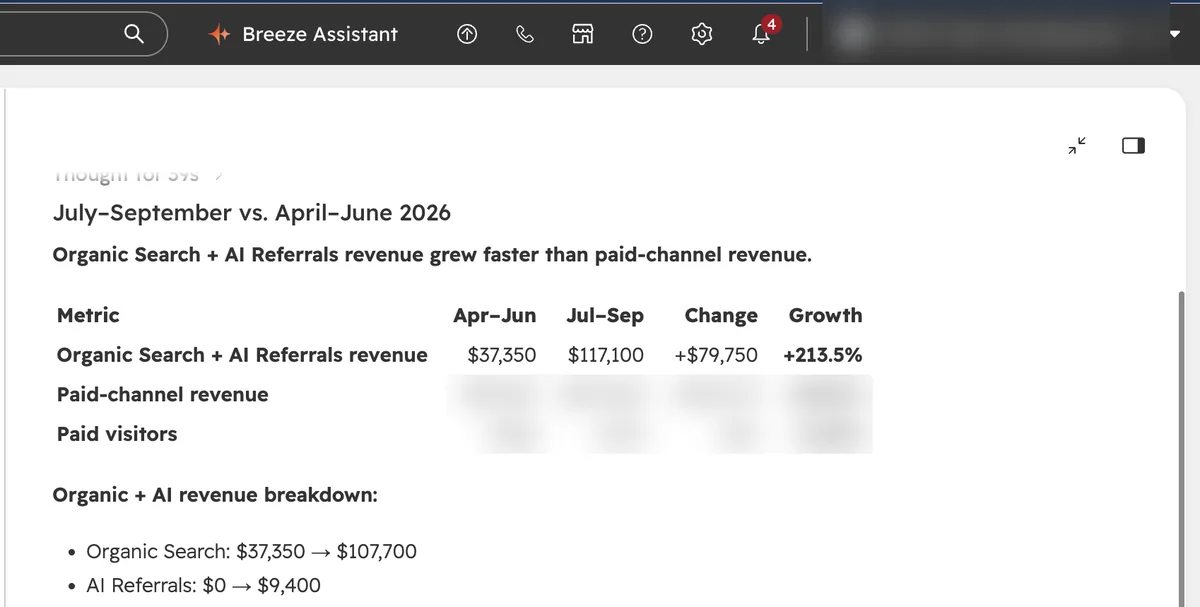 Open the screenshot at full size ↗
One quarter against another is not a controlled test, and UK consent rules did not shape this US result; it shows the reporting layer we build under every set-up. Our write-up of that CRM result explains the method.
Questions teams ask.
Is Consent Mode v2 mandatory?
Google’s EU user consent policy applies to visitors in the EEA, the UK and Switzerland. Google Ads Help says that to keep using its measurement, ad personalisation and remarketing tags for EEA users, you must collect consent and share the signals with Google, and the policy applies the same consent duties to UK and Swiss visitors. Whether the law requires a banner is a separate question for your adviser.
Should a B2B lead site use basic or advanced Consent Mode?
Advanced gives Google cookieless pings and an advertiser-specific model, and it is the only route to GA4 behavioural modelling. Basic sends nothing before a choice. Chapter 3 has a five-step decision.
Will Consent Mode stop leads coming through my form?
No. The form submits whatever the visitor chooses, and the enquiry reaches your inbox and CRM. Consent Mode only changes what Google Analytics and Google Ads can record about that visitor.
Why does GA4 show fewer leads than our CRM after we added a banner?
Because visitors who decline analytics are not recorded as normal sessions, and most B2B sites are below the volume Google needs to model the gap. Record the gap monthly and count leads in the CRM.
Do LinkedIn and other non-Google tags respect Consent Mode?
Not automatically. Consent Mode signals are read by Google tags. In Google Tag Manager, set each non-Google tag to require additional consent, such as ad_storage for advertising pixels, so it fires only when that consent is granted.
Sources, all read 25 November 2026: Google, consent mode overview; Google, set up consent mode; Google, verify consent mode; Google Ads Help, about consent mode; Google Ads Help, consent mode for EEA traffic; Google Ads Help, set up and manage consent; Google Ads Help, consent mode modeling; Google Ads Help, Customer Match consent FAQ; Google Ads Help, restricted data processing; Google Analytics Help, behavioural modelling; Google Analytics Help, DebugView; Tag Manager Help, consent settings; Google EU user consent policy; HubSpot Knowledge Base, updated 3 Sep 2026; ICO, storage and access technologies: exceptions; ICO, the Data (Use and Access) Act 2025, updated 19 Jun 2026. Prolinkage’s own client CRM reporting, Apr–Sep 2026. Not legal advice.