
The short answer.
To protect lead quality from bots and AI-agent form fills, filter in layers and never let an unchecked submission count as a conversion. Put a honeypot field, a minimum time-to-submit and a challenge such as Cloudflare Turnstile or reCAPTCHA v3 on the form; verify the token and the email and website on your server; score what passes for pitch and impersonation patterns; and send Google Ads only the leads a person or a rule has qualified. Google’s own help page says its invalid-traffic filters “cannot block traffic from your site” and that bots or people can still submit your forms.
Blocking is the easy half. The expensive half is the data. A bot that triggers your thank-you page teaches Smart Bidding to find more visitors like it, and your cost per lead improves while the pipeline stays flat. That is why this sits with our conversion rate optimisation work rather than with IT: the goal is more real enquiries, counted correctly, not fewer form fills.
Prolinkage framework. Layers 1 to 3 stop machines; layer 4 catches people writing to sell, not buy; layer 5 decides what your ad platforms learn from. Skipping a layer moves its work to your sales team.
What is filling forms in 2026.
Three different things now fill B2B forms, and they need different responses: scripted bots, people (often helped by a language model) pitching or impersonating, and AI agents doing a genuine task for a real person.
The background level of automation keeps rising. Imperva, a bot-security vendor, reported that automated traffic made up 51% of all web traffic in 2024, with bad bots at 37%, up from 32% the year before (Bad Bot Report, 15 April 2025). Its 2026 report put automation at more than 53% of web traffic in 2025, with humans down to 47%, and treated AI agents as “a new category of internet participant” (29 April 2026). These are vendor figures across all websites, not a measure of form spam, but they explain why an unprotected form fills up.
Imperva (a Thales company), Bad Bot Report 2025 (published 15 Apr 2025, 2024 data) and 2026 (published 29 Apr 2026, 2025 data). Vendor studies of traffic across its customers’ sites. Bar length relative to 100%.
| Kind | What it looks like | What stops it |
|---|---|---|
| Scripted bots | Gibberish names, a message that is only a link, the same text from many addresses | Honeypot, timing, a challenge, server-side token check |
| Pitches and impersonation | Fluent, polite, often written with a language model; selling to you, or posing as a large brand | Scoring rules and a person; challenges do not help, because a human sent it |
| AI agents for real people | A browser agent such as ChatGPT agent doing a task a buyer gave it | Nothing should stop it; verify it, then judge the content like any other enquiry |
Most advice deals only with the first row. On our own forms the second cost more time, and firewalls often treat the third as the first.
What reached our own forms.
When we classified every submission to our own two website forms between 15 September and 5 November 2026, none of the 30 came from a buyer. Eleven were our own tests, seven were spam, six were vendor sales pitches and six were impersonation attempts.
Prolinkage’s own forms, every entry classified by hand, 15 Sep–5 Nov 2026. A young site with little traffic, so treat the mix, not the volume, as the lesson. First published in our enquiry-path audit.
The fixes are in the nine leaks we found on our own site. Here, what matters is how the 19 non-test entries gave themselves away, because those patterns became the rules that now score every new entry.
- Machine tells: random-character names, a message that is nothing but a URL, the same text from several addresses, webmail addresses with dots scattered through the username.
- Pitch tells: first-person copy about what they can do for you; a request for your “packages, pricing and proposal” with no word about their own business; a link to their own calendar.
- Impersonation tells: a sender domain made of a well-known brand name plus “llc”, “inc” or “global”; an email domain that does not match the company website given; one sender name appearing on several different domains; a domain registered within the last few months, or a look-alike of an older domain on a different ending.
The impersonation entries were the most convincing: fluent, polite, and written in the name of a company far larger than any we would expect to hear from. A challenge widget would have let every one through, because a person sent them.
Why it poisons conversion data, not just the inbox.
A fake form fill that reaches your thank-you page is recorded as a conversion, and automated bidding treats every conversion as a success to repeat. Google says its filters cannot stop this for you.
Google Ads Help on invalid traffic, whose lead-form guidance PPC Land reported in September 2026, says the filters “cannot block traffic from your site because they run after an ad serves”, that “Sometimes real users submit fake contact details or other invalid information”, and that bots or users “can still submit forms even if Google identifies the ad interaction as invalid.” For the form itself it recommends reCAPTCHA, server-side validation and a double opt-in; elsewhere on the same page it points to enhanced conversions and lead goals such as “qualified lead” and “request quote”. On 12 November 2026 Google said that, so far in 2026, it had reduced advertisers’ exposure to invalid leads by an average of 30%. An average reduction is not a filter you control.
- 01 · SUBMITA script or a pitch completes the form
- 02 · COUNTThe thank-you page fires a Google Ads and GA4 conversion
- 03 · LEARNSmart Bidding records it as a success
- 04 · FINDBidding pays for more clicks that resemble it
- 05 · REPORTCost per lead falls while qualified pipeline stays flat
Breaking the chain at step 2 is what protects the budget. Breaking it at step 1 only protects the inbox.
The same leak reaches GA4 and the CRM in different sizes. Our GA4 lead numbers audit explains why spam usually inflates the inbox more than GA4, and our comparison of cost per lead and cost per qualified opportunity shows which number to judge a channel on. If you buy search traffic, the waste audit in our Google Ads cost guide covers the spend side.
Real and fake: the anatomy of a lead.
No single field proves an entry real or fake. It is the way the fields agree with each other that tells you. The two entries below are invented, but each detail is one we see in practice.
Likely buyer
Email: ops lead at hallbrookfreight.example
Website: hallbrookfreight.example ✓ matches
Message: “Quote requests from our site dropped after the redesign in August. We sell pallet freight to UK manufacturers.”
Time on page before submit: 2 min 40 s
✓ Names their own problem ✓ Domain matches ✓ Market you serve ✓ Human pace
Impersonation attempt
Email: procurement at bigbrand-global-llc.example
Website: bigbrand.example ✗ different domain
Message: “We are reviewing vendors for a new project. Kindly send your packages, pricing and proposal.”
Domain age: registered seven weeks ago
✗ Brand plus suffix ✗ Email and site disagree ✗ No problem named ✗ New domain
Both entries are invented for illustration; the domains use the reserved .example ending.
The impersonation entry would pass a CAPTCHA, a honeypot and a check that the email domain exists. Only reading the fields against each other catches it, which is why layer 4 exists. A pitch is similar but honest: a real supplier writing from its own domain. Neither should count as a lead.
Form-level defences compared.
Start with controls a buyer never notices: a honeypot and a minimum time-to-submit stop most scripted bots. Add an invisible challenge, verified on your server, for the rest. Visible puzzles are the last resort on a sales form.
| Control | How it works | Stops | Misses | Friction for buyers |
|---|---|---|---|---|
| Honeypot field | A hidden field only scripts fill | Simple form-filling scripts | Bots that render the page like a browser; all humans | None |
| Minimum time-to-submit | Flag entries sent seconds after page load | Scripts that post instantly | Slow or headless-browser bots; humans | None, if set to a few seconds |
| Cloudflare Turnstile | Background check; your server verifies the token | Most automated submissions | Human pitches and impersonation | Usually none; sometimes a checkbox |
| reCAPTCHA v3 | Scores 0.0 (bot) to 1.0 (good); you set the cut-off | Most automated submissions | Human pitches and impersonation | None visible; you decide what a low score does |
| Double opt-in | The lead clicks an emailed link before it counts | Fake addresses; bots without inboxes | Real addresses used by pitchers | High for a sales enquiry; better for downloads |
Two details catch teams out. Google’s reCAPTCHA v3 documentation says tokens “expire after two minutes”, so request the token when the visitor presses submit, not when the page loads, or slow, careful buyers get rejected. It also suggests a default threshold of 0.5; start by flagging, not blocking, anything below it, and look at what you would have lost. Cloudflare’s documentation for Turnstile says “The client-side widget alone does not protect your forms”: you must call its Siteverify API from your server, and each token is valid for 300 seconds and meant for single use. Many WordPress form plugins offer both; check the server-side check is switched on.
Both services process visitor data, so list them in your privacy notices in the US and the UK alike. And do not reject every Gmail or Outlook address: many owners of small firms use one.
Server-side checks that catch what widgets miss.
Anything a browser sends can be forged, so the real checks run on your server, before the entry reaches your CRM or fires a conversion. On most WordPress, Webflow or HubSpot forms they are a day or two of developer time.
- Verify the challenge token on the server. Reject an entry whose Turnstile or reCAPTCHA token is missing, expired, reused or for the wrong action. A bot that posts straight to your form endpoint fails here.
- Check the email domain properly. Does it have mail records? Is it on a disposable-mail list? Is it a webmail address (a mild signal, not a reason to reject)?
- Compare the email with the website field. A work email on the same domain as the company website is the strongest single signal of a genuine B2B enquiry. A brand-name website with an unrelated email domain is the strongest single signal of impersonation.
- Look up the domain’s age. A public registration-data lookup tells you when a domain was registered. A company “domain” registered weeks ago, writing as a household name, deserves a person’s eyes before anyone replies.
- Catch duplicates. The same message text from different addresses, or the same name across several domains, is a campaign, not a buyer.
- Score the language last. Pitch phrases, a message that is only a link, or text that ignores the question your form asked.
Every check adds a reason code rather than deleting the entry, so you can review each week what was flagged and loosen a rule that catches real people. Keep flagged entries out of the lead count and out of your ad platforms. If you want to go further and let software rank genuine enquiries by fit, our sibling guide on AI lead qualification and scoring covers that step; this guide stops at deciding what is a lead at all.
AI agents: block, allow or score?
Do not block AI agents wholesale. A signed agent acting for a real buyer is a prospect using a new tool, and the better agents now prove who they are. Verify them, let them through, and judge what they submit on its content, like any other enquiry.
OpenAI launched ChatGPT agent on 17 July 2025 as a system that can “navigate websites” and act on a user’s behalf, and it says the agent “requests permission before taking actions of consequence”. Its allowlisting page explains that the agent signs its requests using HTTP Message Signatures (RFC 9421), with a Signature-Agent header set to “https://chatgpt.com” and public keys at a well-known address. Akamai, Cloudflare, HUMAN and Vercel can verify it for you. Cloudflare introduced a “signed agents” category on 28 August 2025 for agents “generally directed by an end user”, with ChatGPT agent in the first group.
| Visitor | How you know | What to do |
|---|---|---|
| Signed AI agent | Verified signature, or your CDN’s signed-agent label | Allow; score the enquiry on its content; reply as to a person |
| Unsigned browser automation | Fails or skips the challenge; odd timing; no signature | Challenge; flag for review rather than silently drop |
| Direct form post | No page load, no token, honeypot filled | Reject at the server; never count it |
An agent asked to “get quotes from three providers” often writes a short, generic message. That is a buyer delegating, not spam. Ask one specific question on the form, such as what prompted the enquiry, so people and agents both give you something to qualify on. And check that a firewall set to challenge every automated visitor is not blocking signed agents before they reach the form.
Keep junk out of bidding.
Only a submission that has passed your server checks may fire a conversion, and only a qualified lead should be the goal bidding chases. Everything else stays in your CRM, labelled, and out of Google Ads. Four changes do it:
- Fire the conversion after validation. If the thank-you page fires the Google Ads tag, any bot that reaches it counts. Fire from the confirmed submission, with a unique transaction ID per entry.
- Make a qualified lead the primary goal, with the raw form fill as a secondary action. Our sibling guide to Google Ads conversion tracking for lead generation walks through the setup.
- Send outcomes back. Enhanced conversions for leads sends hashed lead details from your form and later matches the leads that became customers. Google Ads Help says that from 15 June 2026 these uploads move to the Data Manager API. Our offline conversion tracking guide covers the CRM side.
- Retract what slipped through. Google Ads conversion adjustments can retract a conversion, which removes it and sets its value to zero. Online conversions can be adjusted only if they carry a transaction ID.
If Google Ads is the source, ask for a review. Use the Click Quality Form within 60 days of the activity; for leads, Google’s invalid-traffic page asks for a spreadsheet listing the GCLID for each one and your assessment of it, such as the result of calling or emailing. Credits, when granted, appear as billing adjustments. Capturing the GCLID in a hidden form field makes the request possible; our article on website lead tracking shows how to keep the source with each lead.
The signal scorer.
Tick what is true of one form entry. The scorer uses the same signal families as our own rules, with simplified weights, and suggests where the entry should go. Nothing is sent anywhere. It is a teaching aid, not a production filter.
Score 0 of 100 · Tick the signals that apply.
Positive signals add up to 100. Red flags subtract, and two of them stop the entry outright.
What this looks like in our work.
Most of our tracking work starts with numbers nobody trusts: conversions that fire twice, tests that count, spam that looks like demand. One client put the outcome this way.

“Their expertise in setting up precise conversion analytics via GTM allowed us to correct our earlier tracking errors and gain clear insights into our marketing performance.”
See our conversion tracking service
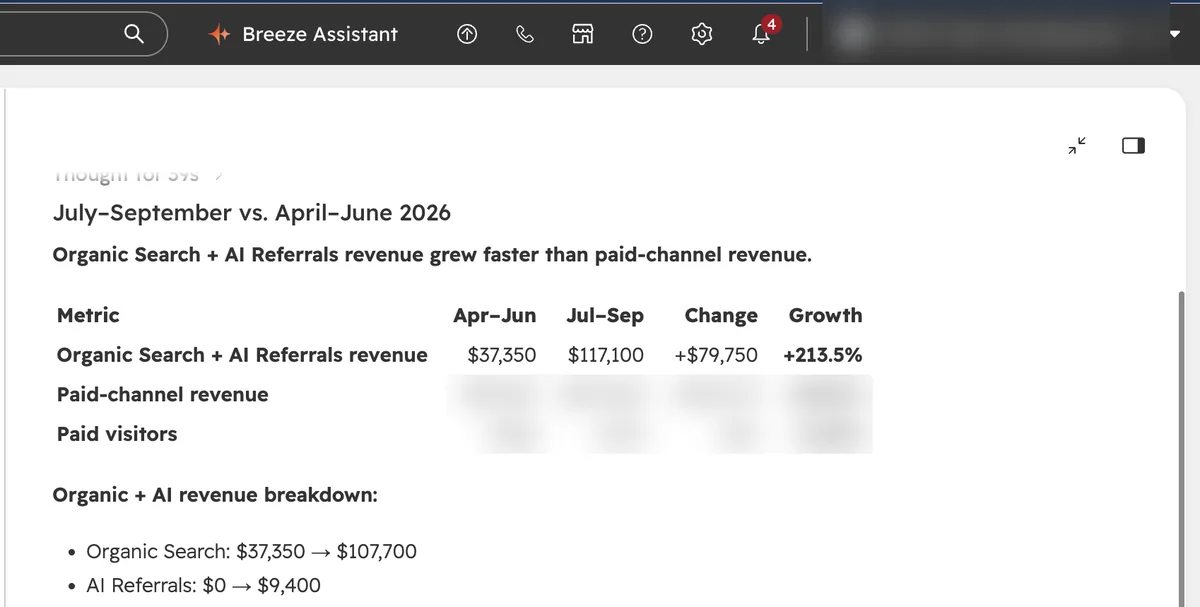
Clean data is what makes revenue visible. For a US B2B company (name withheld), once the CRM recorded each deal against its original traffic source, HubSpot credited organic search and AI referrals with more closed-won revenue in the third quarter of 2026 than in the second, and AI referrals appeared as a revenue source for the first time.
A US B2B company (name withheld). Closed-won HubSpot revenue credited to Organic Search and AI Referrals: $37,350 (Apr–Jun 2026) to $117,100 (Jul–Sep 2026). AI Referrals alone: $0 to $9,400.
 Open the screenshot at full size ↗
One quarter against another is not a controlled test, and spam filtering was not the work behind that result. It shows why we insist on it: a revenue report is only as honest as the leads underneath it. Our write-up of that CRM result explains the method, and more dated results are on our case studies page.
Questions owners ask.
How do I stop spam form submissions without a CAPTCHA?
Combine a honeypot field, a minimum time-to-submit and an invisible check such as Cloudflare Turnstile or reCAPTCHA v3, verified on your server. Buyers see nothing. Server-side checks on the email, website and duplicates catch the rest.
Why am I getting fake leads from Google Ads?
Google filters invalid clicks after an ad serves, but its help page says those filters cannot block traffic from your site, and bots or people can still submit your forms. If your conversion counts every form fill, bidding then finds more of the same. Validate submissions before they fire a conversion and make a qualified lead the primary goal.
Can Google refund fake leads?
Google issues credits for invalid traffic it detects, as billing adjustments. For invalid leads you can request an investigation, within 60 days, with a spreadsheet listing each lead’s GCLID and your assessment, such as the result of contacting them. Capture the GCLID in a hidden form field so you can.
Should I block AI agents from my contact form?
No, not wholesale. Signed agents such as ChatGPT agent identify themselves with HTTP Message Signatures that Cloudflare, Akamai and others can verify. Let verified agents through and judge the enquiry on its content. Keep rejecting scripts that post straight to your form.
Is reCAPTCHA enough to stop fake leads?
No. reCAPTCHA and Turnstile stop most automated submissions, but pitches and impersonation attempts are sent by people and pass any challenge. Those need scoring: does the email match the website, is the domain new, does the message name a problem of their own?
Sources, all opened 25 November 2026: Google Ads Help, invalid traffic; Google blog, 12 Nov 2026; PPC Land, 20 Sep 2026; reCAPTCHA v3 docs; Turnstile Siteverify docs; OpenAI, ChatGPT agent allowlisting; OpenAI, 17 Jul 2025; Cloudflare, signed agents, 28 Aug 2025; Imperva 2025 (vendor); Imperva 2026 (vendor); Google Ads Help, enhanced conversions for leads; Google Ads Help, conversion adjustments. Own data: our two forms, 15 Sep–5 Nov 2026. Client result: HubSpot, Q2 vs Q3 2026. Examples and weights are illustrative.